7-Bedrock
April 17, 2025
Solved

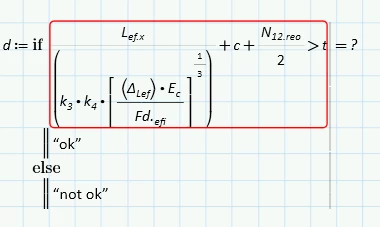
error in if function

  • April 17, 2025
  • 2 replies
  • 3285 views

AM_10506871_0-1744901096126.png

The  error is - "The value must be a scalar"

Best answer by terryhendicott

Hi,

Please upload your worksheet.  What version of Prime are you using.

Cheers


2 replies

21-Topaz II
April 17, 2025

Hi,

Please upload your worksheet.  What version of Prime are you using.

Cheers


23-Emerald IV
April 17, 2025

The other point is: Did you type the square brackets? If you did, remove them.

By typing a square bracket, you create an Array, or Vector, and that is not a scalar.

You should NEVER type a square bracket to create a subset of an expression, Prime will change the look of ordinary (round) brackets to square if it sees fit to do so, but they will still be treated as round brackets, and that how you normally want them.

So if you typed the square brackets, remove them and replace them with round brackets if needed, but I guess Prime will put in round brackets automatically once you remove the squares.

 

Success!
Luc

7-Bedrock
April 18, 2025

Awesome, thank you.


I trying to use solve block and getting some errors , 


AM_10506871_0-1744947112969.png

I use prime 10.0, I have uploaded my sheet, open to suggestions to do it another way


21-Topaz II
April 18, 2025
