1-Visitor
April 4, 2020
Question

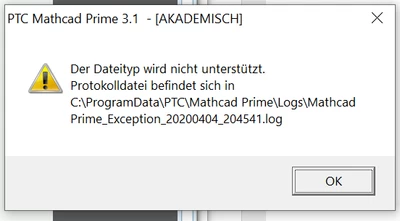
Error Message
  • April 4, 2020
  • 2 replies
  • 2310 views

Johnny0014_0-1586025958351.png

Every time i want so save my file this error message appears? Do you know how to fix it?

2 replies

24-Ruby IV
April 4, 2020

Attach, bitte, your file!

25-Diamond I
April 4, 2020

@ValeryOchkov wrote:

Attach, bitte, your file!


How could he attach the file if he is not able to save it correctly?


@Johnny0014 

Does it happen with every file you try to save? Does it also happen if you open an already existing, saved file and you try to save it again?

Which file name do you try to save the file to? Did you try using a simple filename like "abc" (you should not need to type the extension *.mcdx).


Anyway, I have no idea what the reason what the reason for your problem may be, but I suggest that you contact PTC support.


16-Pearl
April 7, 2020

@Johnny0014,


  • Rename the file MathcadPrime.exe.Config to old_MathcadPrime.exe.Config  in the location "C:\Program Data\PTC\Mathcad Prime"
  • Rename the folder PTC to old_PTC in the location " C:\Users\%username%\Appdata\Local"
  • Clear temporary files on machine
  • Try launching Mathcad using administration privileges.
  • If none of the above steps works you can try to uninstall and reinstall Mathcad Prime also, get in touch with PTC technical support for more assistance.