3-Newcomer
March 7, 2023
Solved

Error Message: File type is not supported.

  • March 7, 2023
  • 1 reply
  • 1932 views

Hello all,


I recently got an error message when I opened Mathcad file, attached below. Error message says
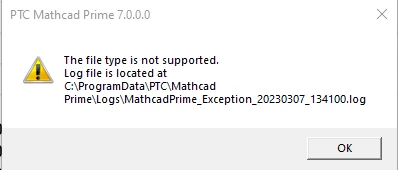
JL_10613686_0-1678225297994.png

Are there any means to resolve it? Thank you so much

Kind regards



Best answer by Werner_E

Actually the file is damaged. Happens quite often with Prime and Prime does not provide any means for automatic backups or for repairing damaged files.

Hope you can fall back to a recent backup.


EDIT: I was able to recover part of the file, but while most embedded pictures still were there, the Prime file had lost the references. For whatever it may be worth I attach the Prime file (without the pictures) and pictures themselves in the zip file "media".

Maybe someone else is able to do a better job in repairing the file.


1 reply

23-Emerald III
March 7, 2023

What version of MathCAD wrote that file?

What version of MathCAD are you using to open the file?

3-Newcomer
March 7, 2023

Mathcad Prime 7.0.0.0

Werner_E25-Diamond IAnswer
25-Diamond I
March 7, 2023

Actually the file is damaged. Happens quite often with Prime and Prime does not provide any means for automatic backups or for repairing damaged files.

Hope you can fall back to a recent backup.


EDIT: I was able to recover part of the file, but while most embedded pictures still were there, the Prime file had lost the references. For whatever it may be worth I attach the Prime file (without the pictures) and pictures themselves in the zip file "media".

Maybe someone else is able to do a better job in repairing the file.
