
1-Visitor
October 28, 2019
Question

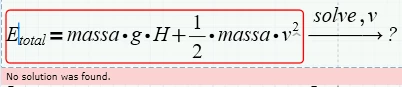
error "no solution was found" in solve funcion

  • October 28, 2019
  • 6 replies
  • 2448 views

Can anyone explain why some equations do not work with the solver command and how can I work around this error?


Here's an example of one of these errors ...
Anotação 2019-10-27 231747.png

isolating speed is simple in this example but still gives error.


thanks in advance


6 replies

23-Emerald I
October 28, 2019

Prime 6 works for me.  

Capture.JPG

Are the labels correct?


24-Ruby IV
October 28, 2019

e3.png

23-Emerald IV
October 28, 2019

Please attach your worksheet showing the offending part.

Without that, it's very hard to find the cause of the error.


Luc

25-Diamond I
October 28, 2019

Here is what I get in Prime 6, using the new and the old symbolic

B.PNG


I think that Fred's guess is correct and you experience  a problem due to Prime's infamous auto labeling.

Check if both "v" in that region (the one in the formula and the other after "solve") are labeled the same (either both "variable" or both "-")


21-Topaz II
October 29, 2019

Hi,

I do this way:

speed calculation.jpg

ttokoro
21-Topaz I
October 30, 2019

image.png

image.png

I have same error in Prime 6.

image.png

Prime 5 can solve.

image.png

Both can solve.

t.t.
21-Topaz II
October 30, 2019

Hi,

a way to solve the problem is the following:

ttokoroanswer.jpg