
1-Visitor
September 19, 2021
Question

Error summing range with units

  • September 19, 2021
  • 5 replies
  • 2872 views

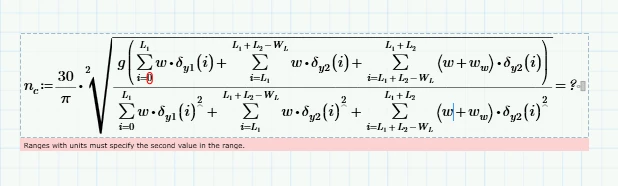
I have a range of lengths. I need to sum them after pushing them through a function. Unfortunately the sum operator is not happy and stating: "Ranges with units must specify the second value in the range". Thank you for your time and help.mathCADSumPost.PNG
5 replies

21-Topaz II
September 20, 2021

Hi,

The issue is earlier in the worksheet.

Please enclose the worksheet.

Cheers

Terry

24-Ruby IV
September 20, 2021

Your post is missing a worksheet (attachment).

23-Emerald V
September 20, 2021

@EP_10048426 wrote:

I have a range of lengths. I need to sum them after pushing them through a function. Unfortunately the sum operator is not happy and stating: "Ranges with units must specify the second value in the range". Thank you for your time and help.]


What this normally means is that the user has defined a range with units, but only specified the first and last values, eg, i:=1 m..10 m.


Mathcad requires ranges with units to have the 'step' value, eg, i:=1 m, 2 m .. 10 m.


However, as noted in other messages, it is difficult (read 'normally impossible') to diagnose an error without the guilty worksheet.  Error messages can be misleading or complete red herrings.


Cheers,


Stuart

23-Emerald IV
September 20, 2021

First off: Yes the worksheet is needed! (You should ALWAYS attach the worksheet, or a minimised version, that shows your problem).


Assuming you have i defined as a range with units, this is Prime behaviour:

LucMeekes_0-1632136353009.png

LucMeekes_1-1632139340545.png

Success!
Luc

25-Diamond I
September 21, 2021

I don't think that the OP has defined a range variable above the expression shown in the pic. It looks to me that the problem is rather that the upper limit of his sum is not a simple scalar but a quantity with a unit, maybe a length. So basically he is trying to do something like

Werner_E_0-1632192240820.png


Unfortunately I wasn't able to get the desired result using the sum operator alone without having to define something else like a vector or a a global range variable on worksheet level 😞

Werner_E_1-1632192270659.png


OK, one way to avoid defining anything else is to get rid of the units in the summation and add them to the function argument, but I would not recommend doing so:

Werner_E_2-1632192305848.png