
1-Visitor
September 30, 2022
Solved

Error while setting a variable as a symbolic result

  • September 30, 2022
  • 2 replies
  • 1204 views

So I'm working with a trial account while practicing with this software for a new job. I've tried to set up a simple algebraic equation, and set the solution to that equation to a variable, in which you can see here:Capture.PNG
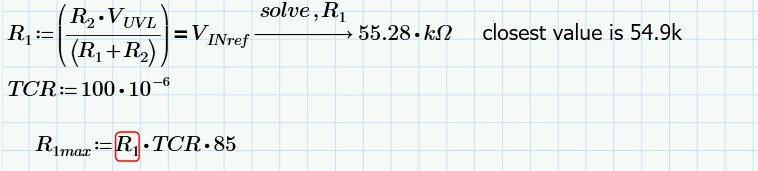
I believe that I set the equation up correctly, however I'm getting this error telling me that R1 is not set up as a variable, despite me defining it with the solve above. What did I do wrong?

Best answer by Werner_E

I guess you ran into an infamous Prime bug which occurs quite often when using symbolics - autolabelling!

Make sure that all variables, especially R1, are labelled the same (either all "Variable" or all "-" which means automatic).

It may also help if you turn on the option "Units/Constants in symbolics" in the calculation options.

But of course we can't be sure as of the cause of the error message without seeing the sheet ...

2 replies

ttokoro
21-Topaz I
21-Topaz I
September 30, 2022

Attach your worksheet to check it.

image.png

t.t.
Werner_E25-Diamond IAnswer
25-Diamond I
September 30, 2022

I guess you ran into an infamous Prime bug which occurs quite often when using symbolics - autolabelling!

Make sure that all variables, especially R1, are labelled the same (either all "Variable" or all "-" which means automatic).

It may also help if you turn on the option "Units/Constants in symbolics" in the calculation options.

But of course we can't be sure as of the cause of the error message without seeing the sheet ...

DSE5141-VisitorAuthor
1-Visitor
October 2, 2022

So I went to actually remake the entire sheet as a sanity check, still had the problem. I swapped on that option, and problem resolved itself. I now have new other interesting bugs (I think) that I need to contend with, but this, which I think was my biggest blocker has been resolved. Really loving this software so far!