1-Visitor
October 30, 2017
Question

Evaluate limits in mathcad15

  • October 30, 2017
  • 4 replies
  • 3556 views

Hi,

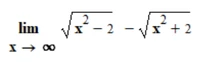
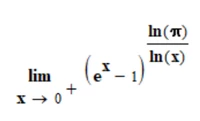
How can I evaluate these two limits in Mathcad15 where I show the steps?

1limit.PNG


2limit.PNG


Thanks in advance!

4 replies

25-Diamond I
October 30, 2017

Mathcad will happily give you the resaults, but is not designed to show the calculation steps so you can pretend that you did it yourself 😉

Bild.png

1-Visitor
October 30, 2017

Mathcad can quite easily calculate the results.  Just use the symbolic solve (Ctrl+.)

However, Mathcad is not intended as a tool to automatically "show the steps."

so-31-VisitorAuthor
1-Visitor
October 30, 2017

When you write symbolic solve (Ctrl+) do you mean the symbolic keyboard window/toolbar, where float, expand, simplify etc. is? 


23-Emerald IV
October 30, 2017

The shortcut key is not 'Ctrl+', its [Ctrl]. (<=== Mark the '.' !) That is: pressing the [Ctrl] key on your keyboard and while that is depressed, tap the '.' key once shortly.

Some people write combined keystrokes with intervening '+' signs, that can lead to misunderstanding.

You've found the symbolic panel (the one with 'solve' etc.) If you hover your mouse over the items on that panel, you will see what shortcut keystrokes are defined (if any).

 

Success!
Luc

24-Ruby III
October 31, 2017
24-Ruby IV
October 31, 2017

It is not bad to plot a function

lim.png