13-Aquamarine
March 25, 2022
Solved

Evaluation symbol (or Evaluated at symbol) - veritcal bar with variables set to a value.

  • March 25, 2022
  • 3 replies
  • 2819 views


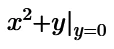
Can PTC MathCAD create the symbol that I've highlighted in the attached photo?  (the vertical bar with the variable set to some specific value)
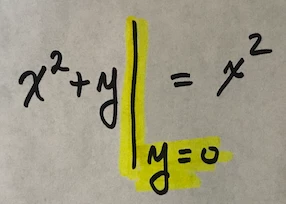
 

math_equation_evaluated_at.png

Best answer by ttokoro

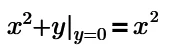
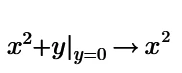
Mathcad Prime can't show =x^2 but -> x^2.

image.pngimage.pngimage.png

3 replies

25-Diamond I
March 25, 2022

@DS_10024912 wrote:


Can PTC MathCAD create the symbol that I've highlighted in the attached photo?  (the vertical bar with the variable set to some specific value)

 

math_equation_evaluated_at.png


You can create the effect, but the display will look much different:

Werner_E_0-1648241260322.png


14-Alexandrite
March 25, 2022

I can't find that evaluation bar in Mathcad 15 or Prime 6, but I found this in Mapple.

evaluation.png

25-Diamond I
March 26, 2022

@mvenich wrote:

I can't find that evaluation bar in Mathcad 15 or Prime 6


Why should you? It doesn't exist 😉


For pure numeric evaluation as you had shown it would look like this in Prime

Werner_E_0-1648255237851.png

or again using symbolic evaluation

Werner_E_1-1648255272298.png


And yes, you can combine program and symbolic eval, but it will never look as demanded in Prime

Werner_E_2-1648255469526.png


And you always can define functions and evaluate them symbolically and/or numerically

Werner_E_0-1648256231736.pngWerner_E_1-1648256280316.png

but the familiar vertical bar as shown in the screenshot of the initial posting can't be achieved using Prime.


ttokoro
21-Topaz I
ttokoro21-Topaz IAnswer
21-Topaz I
September 11, 2022

Mathcad Prime can't show =x^2 but -> x^2.

image.pngimage.pngimage.png

t.t.