
12-Amethyst
June 7, 2016
Question

Excel XLSX read in - Problems

  • June 7, 2016
  • 3 replies
  • 7489 views

HI friends,

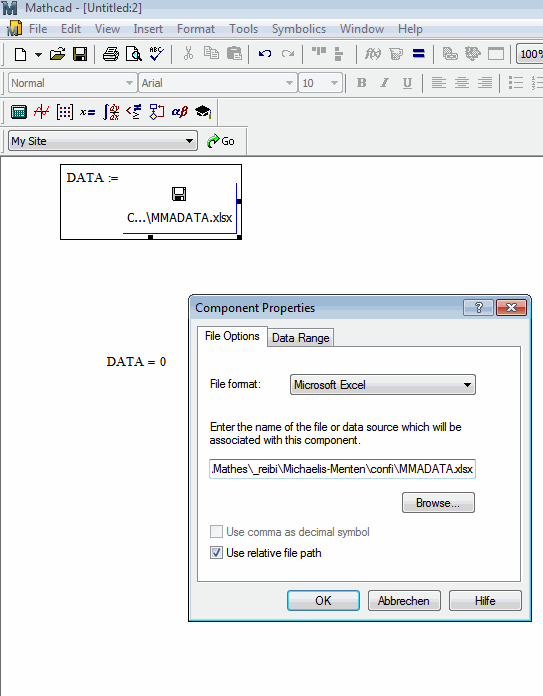
I tried to import an XLS Sheet, which was generated by MMA (with 30 digits after the comma) but get problems. The DATA is always 0.

Can anyone here confirm this with MC 15 M045?

Thanks
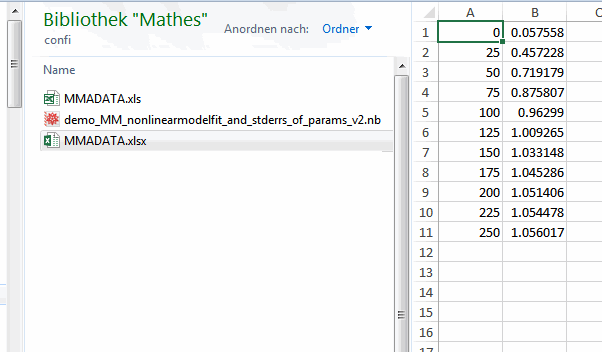
ExcelDATA.gif

ExcelREADIN.gif

3 replies

23-Emerald V
June 7, 2016

Walter,

Could you attach the xlsx file, please?

Stuart

12-Amethyst
June 7, 2016

yes hiere, what working is the EXCELREAD command.

ExcelREADIN_ok.gif

23-Emerald V
June 7, 2016

I get the same thing, Walter, in a slightly earlier version of Mathcad.   However, when I made a copy of your file (using Save As), then the Excel Wizard/Component worked (see Data2ViaWizard). 

What's amusing is that the Component shows the values in the table, but still returns 0.

I can't change the decimal symbol, though ...

Stuart

25-Diamond I
June 7, 2016

Did you check the settings on tab "Data Range"?

Any reason why you don't use READEXCEL to get the data in?

EDIT: Ooops - your READEXCEL comment came at the same time as my answer.

12-Amethyst
June 7, 2016

Werner, yes if I do know,

But I can not select teh DataRAnge, and I want to use default as mentioned in the line.

ExcelDATARRa.gif

19-Tanzanite
June 7, 2016

An alternative is to resave the .xlsx file as a .xls file (from Excel).  M15 then reads it via file input.

Alan

23-Emerald V
June 7, 2016

WALTER SCHRABMAIR wrote:

HI friends,

I tried to import an XLS Sheet, which was generated by MMA (with 30 digits after the comma) but get problems. The DATA is always 0.

Can anyone here confirm this with MC 15 M045?

Thanks
I had a quick look at the xml data for the worksheet and compared it with the data from my (saved as) copy.   They were identical and only used 15/16/17 digits after the decimal symbol.

Stuart

<worksheet xmlns="http://schemas.openxmlformats.org/spreadsheetml/2006/main"><dimension ref="A1"/><sheetViews><sheetView workbookViewId="0" tabSelected="true"/></sheetViews><sheetFormatPr defaultRowHeight="15.0"/><sheetData><row r="1"><c r="A1" t="n"><v>0.0</v></c><c r="B1" t="n"><v>0.057558404187623195</v></c></row><row r="2"><c r="A2" t="n"><v>25.0</v></c><c r="B2" t="n"><v>0.45722770760712766</v></c></row><row r="3"><c r="A3" t="n"><v>50.0</v></c><c r="B3" t="n"><v>0.7191794829918897</v></c></row><row r="4"><c r="A4" t="n"><v>75.0</v></c><c r="B4" t="n"><v>0.8758069400500752</v></c></row><row r="5"><c r="A5" t="n"><v>100.0</v></c><c r="B5" t="n"><v>0.9629897594833632</v></c></row><row r="6"><c r="A6" t="n"><v>125.0</v></c><c r="B6" t="n"><v>1.0092654027889587</v></c></row><row r="7"><c r="A7" t="n"><v>150.0</v></c><c r="B7" t="n"><v>1.033148300481165</v></c></row><row r="8"><c r="A8" t="n"><v>175.0</v></c><c r="B8" t="n"><v>1.0452862671233485</v></c></row><row r="9"><c r="A9" t="n"><v>200.0</v></c><c r="B9" t="n"><v>1.0514055831754439</v></c></row><row r="10"><c r="A10" t="n"><v>225.0</v></c><c r="B10" t="n"><v>1.054477894130151</v></c></row><row r="11"><c r="A11" t="n"><v>250.0</v></c><c r="B11" t="n"><v>1.0560171785670789</v></c></row></sheetData><pageMargins bottom="0.75" footer="0.3" header="0.3" left="0.7" right="0.7" top="0.75"/></worksheet>

12-Amethyst
June 7, 2016

Stuat, yes I tried to put it out from MMA with 30 digits, but I think that is not working. Within MMA I have 30digitx predicsion but in the Excel file there are just 15 digits.

25-Diamond I
June 7, 2016

Guess Excel can't support higher precision as it uses (like Mathcad in numeric mode) standard IEEE format to store its data.
