4-Participant
May 20, 2024
Solved

Explicit Issue Prime 10.0

  • May 20, 2024
  • 3 replies
  • 2657 views

Maybe I'm doing something wrong, but I can't seem to figure it out. There are several posts that show examples of explicit working quite well, but for some reason I can't get it to work.

Here is what I'm trying to replicate:
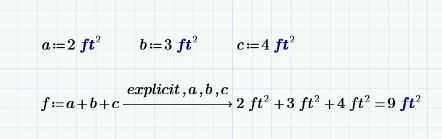
2024-05-20 16_39_51-Window.png

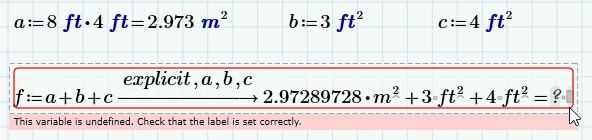
And this is what I get:

2024-05-20 16_36_03-Window.png


Also, is there any way to hide the whole "explicit,a,b,c" part? 

Thanks in advance. 

Best answer by Werner_E

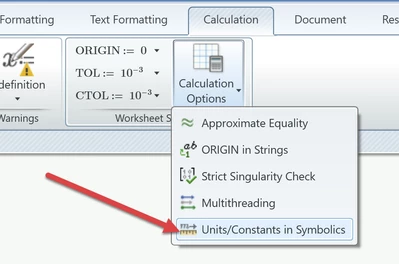
You should turn ON units... in symbolics via the calculation options

Werner_E_0-1716240315084.png

and then recalculate the worksheet (press F9 or F5).


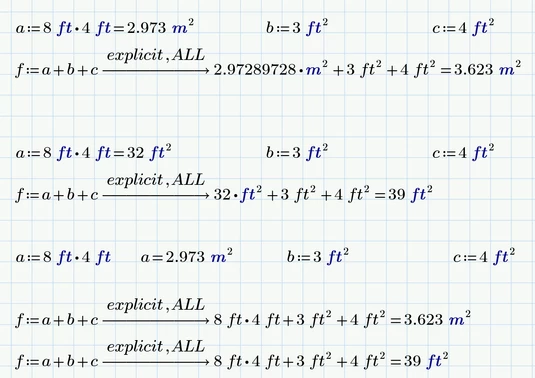
You may also use "explicit, ALL" and of course you always can manually change the unit meter to feet in numerical results:

Werner_E_1-1716240814865.png


For future questions please attach your worksheet if ever possible because its hard and tedious to debug just a picture.


3 replies

18-Opal
May 20, 2024

Can't replicate your problem:

ppal_0-1716239972971.png

You can hide the area but looks like not so explicit any more.

DJNewman
18-Opal
May 20, 2024

What if you did something like...


DJNewman_0-1716239858908.png


Also, hiding the keywords in a symbolic expression is a common feature request but as of Mathcad Prime 10, not currently implemented in Mathcad Prime.

PTC Marketer for Creo and Mathcad. I run their YouTube channels, some Creo campaigns, and all Mathcad campaigns and communications.
DJNewman
18-Opal
May 20, 2024

This also works...


DJNewman_0-1716240493106.png


PTC Marketer for Creo and Mathcad. I run their YouTube channels, some Creo campaigns, and all Mathcad campaigns and communications.
18-Opal
May 20, 2024

I get 

ppal_1-1716240709808.png


Werner_E25-Diamond IAnswer
25-Diamond I
May 20, 2024

You should turn ON units... in symbolics via the calculation options

Werner_E_0-1716240315084.png

and then recalculate the worksheet (press F9 or F5).


You may also use "explicit, ALL" and of course you always can manually change the unit meter to feet in numerical results:

Werner_E_1-1716240814865.png


For future questions please attach your worksheet if ever possible because its hard and tedious to debug just a picture.