
4-Participant
June 30, 2023
Solved

Exporting a matrix to Excel with VBA

  • June 30, 2023
  • 1 reply
  • 3102 views

Hello,


I would like to export a complete matrix from mathcad prime 8.0 to an existing Excel file and in a specified range of cells. While reading through some older posts on this topic, I got the feeling this shouldn't be too hard. I am, however, completely new to VBA. For now i have the following lines:


Sub ExportMatrixToExcel()
Dim MCApp As Ptc_MathcadPrime_Automation.Application
Dim WS As Ptc_MathcadPrime_Automation.Worksheet

Set MCApp = New Ptc_MathcadPrime_Automation.Application
MCApp.Visible = True

MCApp.Open ("E:\Mathcad\test.mcdx")


From here i would like to export the matrix in the mathcad file to my Excel file. The dimension of the matrix is 5x5 and let's say i want to place this matrix in Excel starting at C5 and ending at G9. 


Is somebody willing to help me with this with a general example?

Thanks in advance


Best answer by LucMeekes

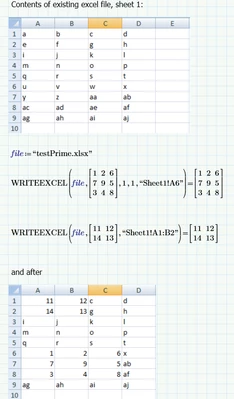
WRITEEXCEL writes data to an excel file. If it doesn't exist, it creates it. If it exists, it overwrites existing data.

Some remarks:

- It doesn't seem to be able to create new sheets in the Excel workbook, you're limited to 3 sheets when the file is created by Prime.

- the function of the arguments 'rows' and 'cols' is unclear.

LucMeekes_0-1688282102549.png


Success!
Luc

1 reply

23-Emerald IV
June 30, 2023

Why not use the Excel interface functions of Prime?

Success!

Luc

DFrancke4-ParticipantAuthor
4-Participant
June 30, 2023

Hi Luc,


I gave this a try before considering VBA. The thing is that the "WRITEEXCEL" function can only write data to a new file, which also only seems te be active for a specific Mathcad worksheet right? This would not be possible for me since I need to export data I calculated to an existing Excel file of my client.

LucMeekes23-Emerald IVAnswer
23-Emerald IV
July 2, 2023

WRITEEXCEL writes data to an excel file. If it doesn't exist, it creates it. If it exists, it overwrites existing data.

Some remarks:

- It doesn't seem to be able to create new sheets in the Excel workbook, you're limited to 3 sheets when the file is created by Prime.

- the function of the arguments 'rows' and 'cols' is unclear.

LucMeekes_0-1688282102549.png


Success!
Luc