Unfortunately Prime changes file format with every version and is unable to save files in a way so that they could be opened with older versions.
User friendliness made by PTC - perhaps one day PTC will realize that greed is not good advice.
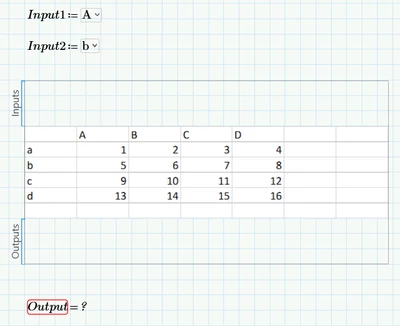
But you can see in the picture how to do it in Prime. Simply add the "table" output to the Prime Excel component and retype what you see in the picture.
For the solution in Excel I used the Prime input region to get your input values in cells A6 and A7 as you can see in the picture.
I added a formula in cell A9 which gets the row number : =SUMPRODUCT((A1:A5=A7)*ROW(1:5))
and another one in cell A10 to get the desired result: =HLOOKUP(A6;B1:E5;A9;0)
This cell A10 is then added as output as you can see in the picture.
There sure may be simpler and more elegant ways to get the value in Excel - especially when you use a newer version of Excel which already provides new functions like XMATCH.