14-Alexandrite
November 21, 2025
Solved

Extract segment lengths"L" of last iteration MC-P11

  • November 21, 2025
  • 1 reply
  • 499 views

Hello All,
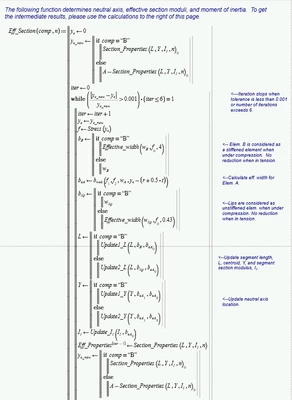
I have attached MC-P11 sheets. How can I  extract the segment lengths values "L" out of last iterations of this following function. There are two conditions as you can see in subsequent calculations:                            1. For Element B in Compression, comp="B"
2. For element C in compression, comp="C"
"L" values can be different or same depending on above conditions  and  segment lengths.
SFares_0-1763756397631.png

Regards,
Sam

Best answer by Werner_E

You saw just the size of the two matrices because Prime per default does so in case of nested matrices.

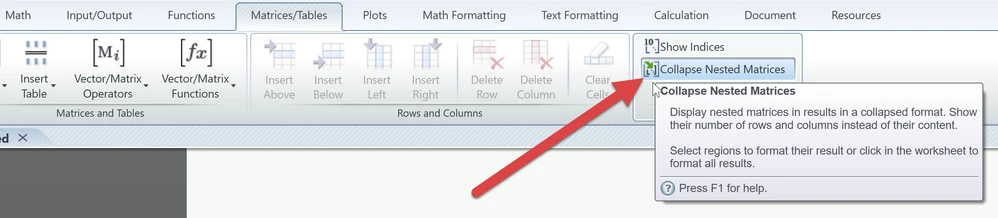
You have to change that behaviour, either for the whole sheet or just for one region by unchecking the option "Collapse Nested Matrices":

Werner_E_0-1763993138817.png


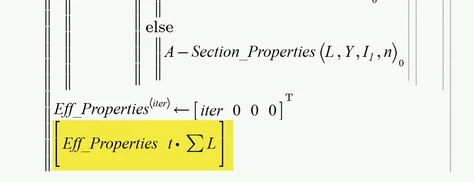
As t seems to be a constant (0.1) which does not change you may return t*sum of L as the second return value.

Werner_E_1-1763993443745.png

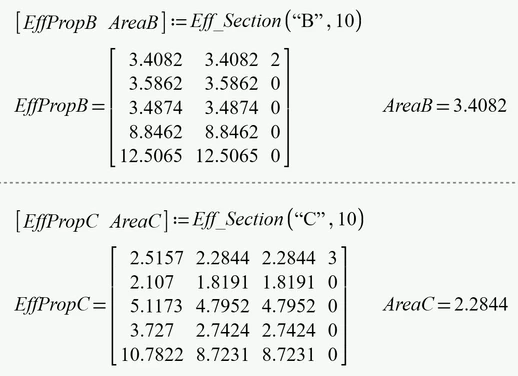
When you later call this function, you can assign it a 1x2 matrix so there is no need to display the nested matrix:

Werner_E_3-1763993617635.png


1 reply

25-Diamond I
November 22, 2025

Its not clear to me what you are trying to achieve.

If your function should return "L" (which is a 11x1 vector) the you simply replace the return value "Eff_Properties" by "L".

In case you want return both you may return a 1x2 matrix consisting of "L" and  "Eff_Properties".

Werner_E_0-1763777375271.png

You may assign the function output a 1x2 vector of variables as well if needed:

Werner_E_1-1763777487751.png


SFares14-AlexandriteAuthor
14-Alexandrite
November 24, 2025

Hello Werner,


Thank you for your response.
What  I am trying to accomplish is to have the effective area which is the sum of L*t included in my effective properties or have it report the vector L  of the last iteration then i will compute the effective area.  When i did what you suggested [ L  Effect_Properties] i was not getting an answer, as you're showing. I was getting the size of two matrices. What Ii did is the following, as shown below, and on page 4 of the sheet, is adding the term highlighted in yellow 

SFares_0-1763989276937.png

On page 5, Draft view, is iterating in a manual way. As i mentioned before, i can have the variable "comp" equal to B or C. Is my approach correct? Also it will be good to report the last  L vector too. I have attached my latest sheet.

Regards,
Sam

Werner_E25-Diamond IAnswer
25-Diamond I
November 24, 2025

You saw just the size of the two matrices because Prime per default does so in case of nested matrices.

You have to change that behaviour, either for the whole sheet or just for one region by unchecking the option "Collapse Nested Matrices":

Werner_E_0-1763993138817.png


As t seems to be a constant (0.1) which does not change you may return t*sum of L as the second return value.

Werner_E_1-1763993443745.png

When you later call this function, you can assign it a 1x2 matrix so there is no need to display the nested matrix:

Werner_E_3-1763993617635.png