14-Alexandrite
July 1, 2023
Solved

Extracting rows from a Matrix of results

  • July 1, 2023
  • 2 replies
  • 6128 views

Hello everyone,


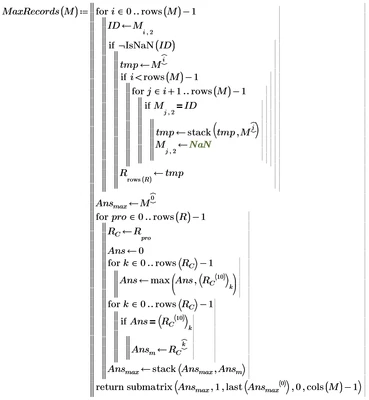
I'm encountering a problem with the attached Mathcad Prime 8 where the custom function MaxRecords(M) isn't yielding the expected results when reading imported data from the attached RAW DATA.xlsx.


The input matrix "MaxT3" passed to the MaxRecords(M) function, comprises five sets of results for each ID where there is a total of 289 IDs. I need to extract only the records with the maximum resultant force FR (column 10). The result from MaxRecords should have only 289 records, but it's currently delivering 1445 records (289x5). Could you please review and let me know where the issue lies?. 


Also, the resultant matrix of maximum records should keep the same order as the matrix MainRunT3:

 

EP_10515634_0-1688172205131.png

I tested the MaxRecords function with a smaller data set and is working fine (see snapshots below of the smaller set raw data and the corresponding MathCAD results):
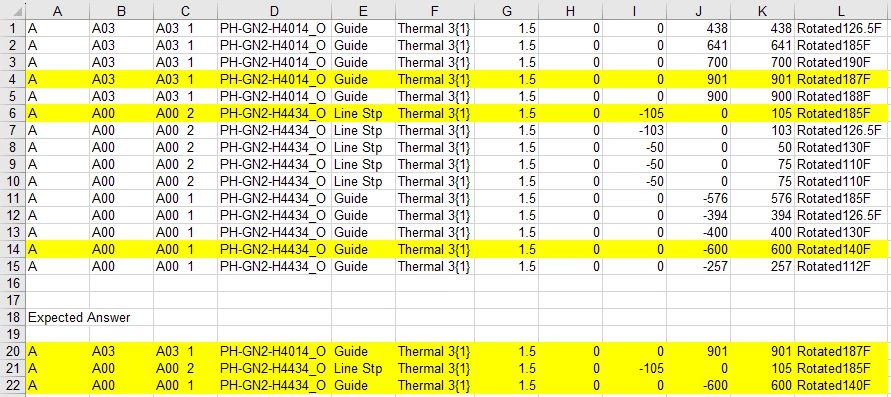
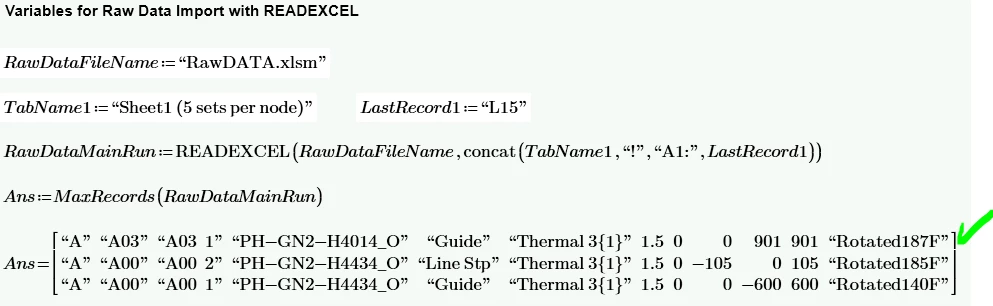
EP_10515634_1-1688173710514.png

EP_10515634_2-1688173773151.png


Finally, please let me know an easy method to disconnect a large matrix from its formula.


The attached prime is version 8. Please keep in mind that currently I don't have access to p9.

Best answer by Werner_E

OK, I fixed the first part of your own MaxRecords() function (creation of vector R). The second part should work OK

Werner_E_2-1688252107525.png


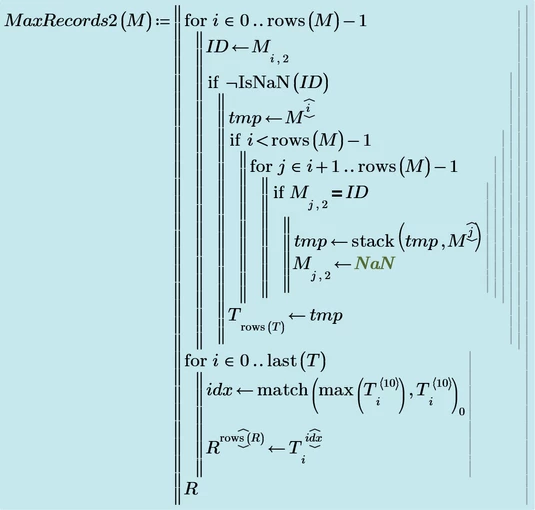
But I preferred to streamline the second half a bit using the match() function.
Here is the function which, as I hope, does what you expect:

Werner_E_1-1688252064313.png

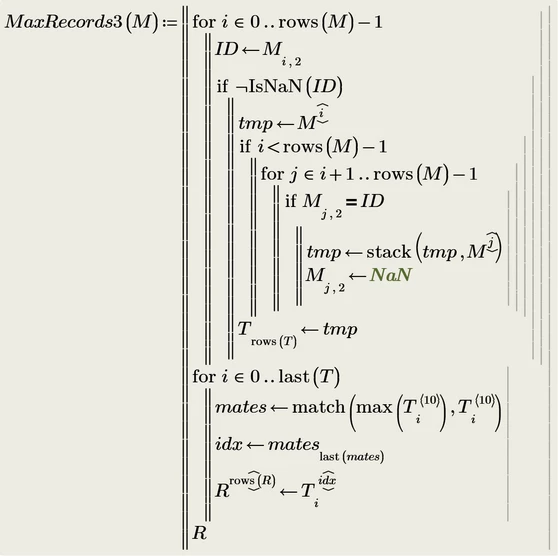
You will notice that MaxRecords2() does not return the very same result as the fixed  MaxRecords(). Reason is that my MaxRecords2() choses the FIRST row if there is more than one row per ID with the same maximum force (occurs usually when the force is zero), while your approach choses the LAST one.

I had already asked in the past what the function should do in that case, but again you ignored that question.

So here is a slight modification which returns the same result as your function:

Werner_E_3-1688252365178.png


Werner_E_4-1688252598183.png


BUT ... the order of the rows in the result matrix are now NOT THE SAME as their order in the original input matrix.
But it looks to me now that this is what you expect (hopefully!).

I attach the full Prime 9 sheet along with a Prime 6 sheet (I don't have P7 and P8 installed) which just includes the function definitions. You should be able to open that sheet and copy the functions (you have to do it one after the other thanks to PTC) in your P8 sheet.


2 replies

25-Diamond I
July 1, 2023

From looking at your code I don't know what your function "MaxRecords" is supposed to do and what different result you expect.

From the Excel screenshot you provide its also not clear to me why these three lines would be your expected answer.

All I can say is that with the xls file you provide your function "MaxRecords" seems to return the input matrix unchanged - AllT3 is identical to MaxT3!

Perez14-AlexandriteAuthor
14-Alexandrite
July 1, 2023

Hello @Werner_E , the function MaxRecords should not return AllT3 unchanged. It should select the rows with the maximum resultant force (column 10) within rows of the same ID (column 2).


The screen shot is for a smaller data set where the MaxRecords is working as expected. The range A1:L15 is imported to create the matrix RawDataMainRun. This RawDataMainRun is passed to MaxRecords function which produces matrix Ans. Ans only has the rows per unique ID with the maximum value under column 10 (column K of the excel screen shot).


I'm not sure why MaxRecords works for the matrix RawDataMainRun from the screen shot example and does not work for the matrix AllT3. 

25-Diamond I
July 1, 2023

> It should select the rows with the maximum resultant force (column 10) within rows of the same ID (column 2).


OK, thats something I could work with.

Why not sort the input matrix for column 2 via csort(M,2) and then run through this sorted matrix, selecting the row with the max value of every next five rows (with the same ID)?


Or is it OK to use the raw data "RawDataMainRun" (which seems to be already sorted by ID), as Terry did, with its 9 entries per ID instead of the already modified data (AllT3) ?


21-Topaz II
July 1, 2023

Hi

I only have Prime 9 so you will have to copy by hand.

A simpler program to extract the maximums exploiting the fact that there are 9 load cases per record

Capture.JPG


Results in:

Capture2.JPG


Cheers

Terry

Perez14-AlexandriteAuthor
14-Alexandrite
July 1, 2023

Hello @terryhendicott , please adapt your proposed function to be use with the matrix AllT3. Process the matrix AllT3 as is with no preprocessing or sorting of any kind. I tried to adapt it with no success:

EP_10515634_0-1688225041967.png

EP_10515634_1-1688225073490.png