
3-Newcomer
May 15, 2020
Solved

Extracting values from a matrix in a program

  • May 15, 2020
  • 2 replies
  • 4392 views

Hi All-

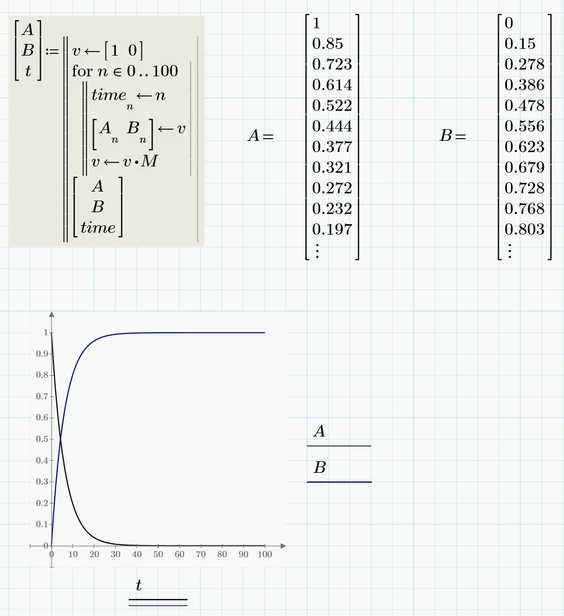
I am attempting to model the first-order change of A --> B. The little programming loop below does the transformation of A to B in time steps of n just fine. The problem is I cannot view the A vs time data as is shown in the MathCAD document below.

I know there are many other ways to solve this simple system, but getting this little programming loop to solve the problem is my goal.

Best answer by Werner_E

How about this approach?

Werner_E_0-1589644875214.png


2 replies

23-Emerald V
May 15, 2020

@Caleb01 wrote:

Hi All-

I am attempting to model the first-order change of A --> B. The little programming loop below does the transformation of A to B in time steps of n just fine. The problem is I cannot view the A vs time data as is shown in the MathCAD document below.

I know there are many other ways to solve this simple system, but getting this little programming loop to solve the problem is my goal.


Hi Caleb,


The reason your program isn't giving the expected result is that you are storing arrays. You either need to write a function/program to flatten them or store the values more directly.   In this case, the latter option is the easier option.   Use stack or augment when you want to create flat arrays of values. 


I've only got Prime Express, so can't use programming, but I hope the following should help point you in the right direction (the program may even work!).


2020 05 15 I.png


Cheers,


Stuart

23-Emerald V
May 15, 2020

Or you could play around with indexing the variables ... a bit messier.


2020 05 15 J.png


Cheers,


Stuart

Werner_E25-Diamond IAnswer
25-Diamond I
May 16, 2020

How about this approach?

Werner_E_0-1589644875214.png


Caleb013-NewcomerAuthor
3-Newcomer
May 18, 2020

Clean and elegant! This is the result I had envisioned when I first started this little task.  I just didn't quite know how to get there.  Thank you.