

1-Visitor
February 17, 2015
Solved

"failed to launch server application" error in Quicksheet

  • February 17, 2015
  • 13 replies
  • 5862 views

Using Mathcad 14 (MO20) under Windows Vista, 32-bit.

Help / Quicksheets / Engineering Applications / WAV files, Spectograms, and Signal Generation.

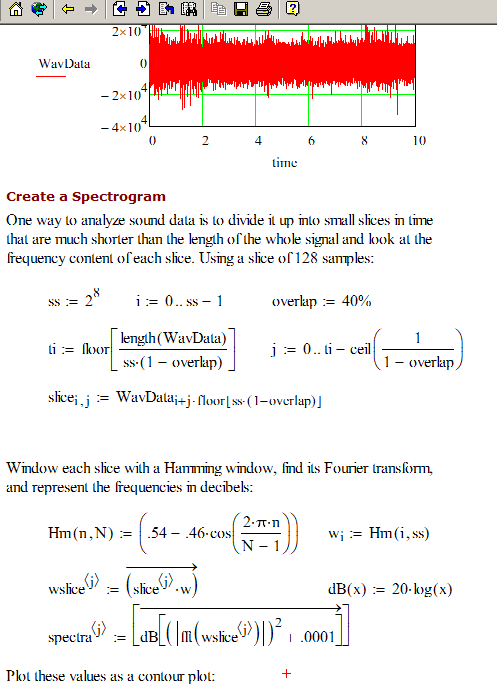
This Quicksheet repeated fails with the message "failed to launch server application" awhen I try to scroll past the last line

in the attached image. Occasionally Mathcad hangs and has to be shut down with the Windows Task Manager.

The embedded WAV file loads fine, as does a WAV file read in from disk.

Why would a pre-tested Quicksheet be giving such an error? Any idea what could be going on?

Thanks,

Tracy
failed to launch.Png

Best answer by RichardJ

I think the 3D plot component is not registered correctly. Try repairing the Mathcad installation.

13 replies

24-Ruby IV
February 17, 2015

I tested in Mathcad 15 M030 version and it works fine. I recommend that you upgrade to the latest service release for MC14 - M035.

19-Tanzanite
February 17, 2015

Do not install M035. It has a serious bug. M030 is the last usable release for MC14.

24-Ruby IV
February 18, 2015

Richard Jackson wrote:

Do not install M035. It has a serious bug. M030 is the last usable release for MC14.

Richard,

Which one?

RichardJ19-TanzaniteAnswer
19-Tanzanite
February 17, 2015

I think the 3D plot component is not registered correctly. Try repairing the Mathcad installation.

thall1-VisitorAuthor
1-Visitor
February 18, 2015

Thanks to everyone for the suggestions. I tried to repair Mathcad in the Windows Control Panel, but I got about 16 messages warning that various objects had failed to register. So I completely uninstalled MathCad, the Resource Center, and HelpCenter. The uninstall left about a hundred orphaned objects in the registry, which I discovered and cleaned with Glary Utilities. Did a new installation, and everything works fine.

19-Tanzanite
February 18, 2015

As a tip for the future, in the Mathcad program folder you will find "regtool.exe". Running it will register everything that Mathcad needs to function.