4-Participant
June 21, 2023
Solved

Filter data using comboboxes

  • June 21, 2023
  • 1 reply
  • 1712 views

Hi!

Is there a way to make a filter based on comboboxes ? i.e.


I want to be able to filter "Type" and "Version" so that the end result is a matrix i can plot


I used vlookup to easily filter "Type", but not sure how i can incoorporate the "Version" filter?


(I've attached my sheet, MCP 9)


Thank you!
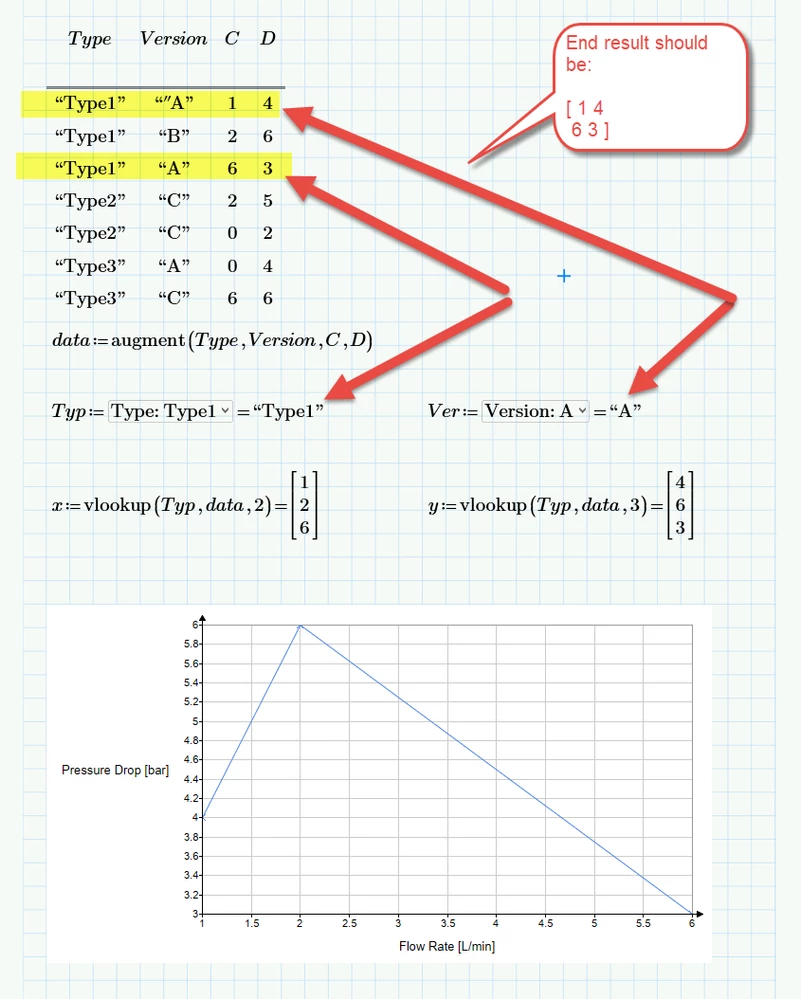
 

2023-06-21_12-17-05.png


Regards
SNA


Best answer by Werner_E

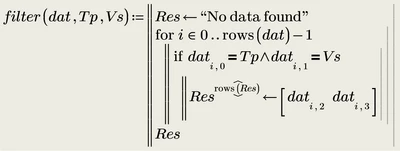
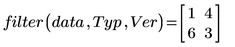
It looks to me that you are looking for a n x2 matrix as the result of the filtering!?

You may write a filter function like the one shown below

Werner_E_2-1687344850178.png

Werner_E_1-1687344475316.png

BTW, you had a typo in the version "A" in the first data row, there was an extra "


1 reply

Werner_E25-Diamond IAnswer
25-Diamond I
June 21, 2023

It looks to me that you are looking for a n x2 matrix as the result of the filtering!?

You may write a filter function like the one shown below

Werner_E_2-1687344850178.png

Werner_E_1-1687344475316.png

BTW, you had a typo in the version "A" in the first data row, there was an extra "


25-Diamond I
June 21, 2023

Here is a different approach, a tricky one-liner

Werner_E_0-1687348285980.png

You may use try  & catch for some error trapping

Werner_E_1-1687348320398.png


4-Participant
June 21, 2023

Hi @Werner_E 


Thank you so much!


Your first suggestion worked perfectly on a bigger data set i have 😁 Although i must confess i do not quite understand what is happening here: 


2023-06-21_13-57-45.png

I will also try your one-liner 🙂


Regards
SNA