18-Opal
January 5, 2022
Solved

FILTERING NaN

  • January 5, 2022
  • 1 reply
  • 4818 views

Hi All

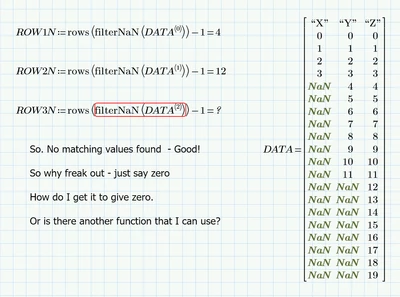
Help required as below. Thanks and Happy New Year.


ppal_0-1641352032378.png


Best answer by Werner_E

> They will not occur in beween valid numbers. 

Where the Nan's are in a column does not matter at all. The buitl-in function "filterNaN" throws an error on two situations:

1) no NaN in the matrix (thats silly as it just should return the original matrix unchanged) this is fixed by my first attempt above

2) NaN is in every row of the matrix. Here we would expect an empty matrix but thats something not provided by Prime. My last two attempts try to fix this by returning NaN instead of a matrix.


in your case you could write a program with a loop that counts and stops when the first value in a column is not a scalar. But as along as the column contains at least one scalar, my short first rewrite of "filterNan" should do the job.

 

1 reply

25-Diamond I
January 5, 2022

Simply write your own, modified "filterNaN" using try and catch

Werner_E_0-1641354913140.png

Note, that you may still run into problems if the argument contains a NaN in every row. You will get back the argument unmodified. Thats no along the logic of the function as you should get back kind of an empty matrix (which unfortunately does not exist in Prime).


In your pic you write that you expect 0 as a result. I guess you'd rather expect a return value of 19!


BTW, I guess you were already told in other threads, ALWAYS include your worksheet if ever possible! If the sheet contains sensible data you are not allowed to share, create a demo worksheet without that data but still showing the problem.


25-Diamond I
January 5, 2022

Here is a routine which returns NaN in case all rows contain a NaN.

At least rows(NaN) returns 0 so it will work OK in the context of your example:

Werner_E_0-1641356647543.png


25-Diamond I
January 5, 2022

Guess its easier that way:

Werner_E_0-1641357036115.png

