1-Visitor
May 16, 2022
Solved

Find doesn't work in mathcad

  • May 16, 2022
  • 3 replies
  • 3317 views

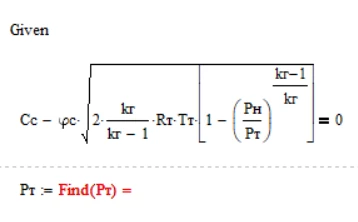
Hello PTC fam, it seems the Find function doesn't work at my end. Mind to take a look? I attached my file

Adlil_0-1652684561729.png


Best answer by VladimirN

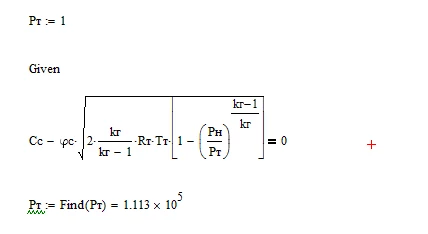
Before "Given" you need to specify the initial value for the variable you want to find.


Pic_1.png


3 replies

VladimirN24-Ruby IIIAnswer
24-Ruby III
May 16, 2022

Before "Given" you need to specify the initial value for the variable you want to find.


Pic_1.png


Adlil1-VisitorAuthor
1-Visitor
May 16, 2022

Thank you for the explanation. I did what you recommend and solved it. Thanks.

25-Diamond I
May 16, 2022

if you evaluate a solve block using numeric evaluation (the "normal" =  ) you are forcing Mathcad to use numerical algorithms which require an initial guess value for the variable you are looking for, as VladimirN had shown.


If you evalute the solve block symbolically, no guess value is required:

Werner_E_0-1652691176847.png

But  I think that In your case a numerical evaluation is more appropriate anyway.

You may want to look up the chapter on "Solving" in the Mathcad help for more details.

Werner_E_3-1652691683305.png


You may also use the "root" command instead of a solve block with "find".  You can use "root" in two different flavors:

Either provide an appropriate range (in the example I used the range from 1 to 10^7)

Werner_E_1-1652691325656.png

or you again provide a guess value before using "root"

Werner_E_2-1652691374249.png


23-Emerald IV
May 16, 2022

Why not solve it symbolically, to get an exact answer:

LucMeekes_0-1652697822945.png


Success!
Luc

25-Diamond I
May 16, 2022

@LucMeekes wrote:

Why not solve it symbolically, to get an exact answer:

Maybe because is doesn't look that useful when doing it in Mathcad 15 rather than in MC11 😉

Werner_E_0-1652705698032.png


24-Ruby III
May 16, 2022

😀