

1-Visitor
June 17, 2016
Solved

Find of solve block

  • June 17, 2016
  • 4 replies
  • 4838 views

Hello everyone,

I am working with Mathcad Prime 3.1, and I use the solve block.

The problem is with the function find:  I want to specify directly (like in Mathcad 15 with the index) the element that should be reported. I don't want to report all the matrix and I don't want neither to use an extra variable to report the specified element of the resultant matrix.
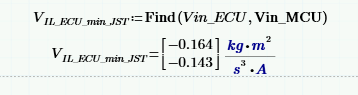
Thanks for your support,

Best regards,

Nadia

Best answer by Fred_Kohlhepp

Nadia;

The attached file was created in Prime 3.0.

Please open it in Prime 3.1, and post a screen shot of the result.

4 replies

23-Emerald IV
June 17, 2016

1st. Can you post the worksheet?

2nd. "and I don't want neither to use an extra variable to report the specified element of the resultant matrix" that is fundamentally impossible. If you want part of a matrix, you have to specify which part. That specification implies at least one variable (which might be a constant).

Luc

nchater1-VisitorAuthor
1-Visitor
June 17, 2016

Hello LucMeekes,

I am referring to this:

The index is used directly in Find function in Mathcad 15. It is not the case in Prime 3.1.

In other terms, I want to do it in the same way than Mathcad 15.

Best regards

Nadia

23-Emerald IV
June 17, 2016

So what is keeping you from typing

    [ORIGIN

at the end of the Find() function, in order to get the first of the list of solutions?

(To get the second of the list of solutions, type [ORIGIN+1 instead.)

Luc

19-Tanzanite
June 17, 2016

It's not clear to me what you want. You are finding two unknowns, so the result is a vector with two rows. If you want to display only one of them, just use a vector subscript.

nchater1-VisitorAuthor
1-Visitor
June 17, 2016

Hello Richard,

I am referring to this:

The index is used directly in Find function in Mathcad 15. It is not the case in Prime 3.1.

In other terms, I want to do it in the same way than Mathcad 15.

Best regards

Nadia

23-Emerald I
June 17, 2016

This works in Prime 3.0:

nchater1-VisitorAuthor
1-Visitor
June 20, 2016

Unfortunately, The subscript  doesn't work with find function in Mathcad prime 3.1

23-Emerald I
June 20, 2016

Nadia;

The attached file was created in Prime 3.0.

Please open it in Prime 3.1, and post a screen shot of the result.

25-Diamond I
June 17, 2016

> The index is used directly in Find function in Mathcad 15. It is not the case in Prime 3.1.

> In other terms, I want to do it in the same way than Mathcad 15.

As Fred has shown ist IS working the same way as in Mathcad 15 - at least in Prime 3.

So why do you think that it does not work that way?

You have neither provided a worksheet nor a screenshot of Prime failing using the very same syntax.

The screnshot you provided in your initial post is missing the matrix index 1 and so you get a vector with both values - all as it should be.

Could it be that you failed because you used the wrong type of subscript (literal instead of matrix)?

12-Amethyst
June 18, 2016

Werner Exinger wrote:

Could it be that you failed because you used the wrong type of subscript (literal instead of matrix)?

I remember me posting for help because I make this mistake in a worksheet and can't found it by myself.

Alvaro.