1-Visitor
February 11, 2021
Solved

Finding symbolic solution for 18 unknowns in Prime 3.1

  • February 11, 2021
  • 5 replies
  • 3072 views

Hello, dear Mathcad community! 


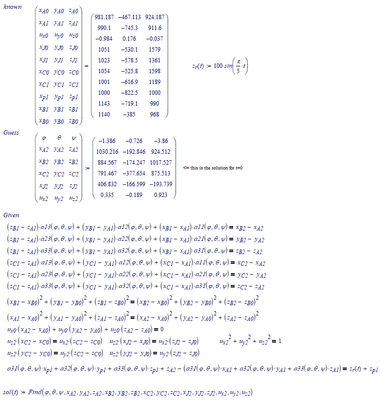
I am working with 18 equations and I need to get the result of 18 unknowns symbolically. 

I have searched through the PTC community and tutorials, but Mathcad is telling me about the error with undefined parameter in the function. Can you please help to figure that out? And is it possible to solve such many equations symbolically in Prime 3.1? 
Best answer by LucMeekes

Alas, (fully) symbolic appears to be beyond Mathcad capacity. The combination of many variables with 2nd order term may result in a problem exceeding 4th order, for which there is no symbolic solution possible in Mathcad.

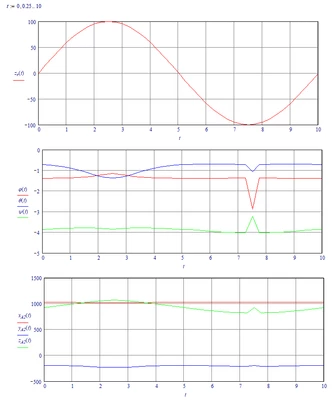
But numerically you can get the values of all your output variables as a function of t:

LucMeekes_1-1613256584320.png

This is how it was set up:

LucMeekes_2-1613256642594.png

From there you can extract the variables as a function:

LucMeekes_3-1613256679379.png

Next you can plot them as shown above.

Oh, don't forget. I assumed that your x.J0 (and y.J0 and z.J0) knowns are on the 4th row (the one with index 3) of you HP matrix. The Prime file didn't (appear to) use these matrix elements. You forgot them?


Success!

Luc


5 replies

23-Emerald IV
February 11, 2021

The very first thing you should do is check the labels of all your variables. Start with phi. Are all your phi's labelled the same? If one is labelled as a 'variable' and another is labelled '-' the symbolic processor may treat them as different variables.


Success!
Luc

24-Ruby IV
February 11, 2021

If you want solve symbolical a system of equations try at first to solve one equation!

Sys.png

25-Diamond I
February 11, 2021

The reason you get this error is because you can't solve symbolically for variables which already have been assigned a value.

You have to clear those variables - either with "clear(...)" or at least with "clear.sym(...)" for symbolic calculations

Werner_E_0-1613082011260.png

I did this and now the region still fails (tried it with Prime 5) with  an "unknown error".
I might be worth to follow Luc's suggestion an label ALL variables the same (either all "Variable" or all "-"(automatic)). Don't forget the variables in the vector after "solve" !


ttokoro
21-Topaz I
21-Topaz I
February 12, 2021

image.pngimage.pngimage.pngimage.pngimage.pngimage.png

t.t.
LucMeekes23-Emerald IVAnswer
23-Emerald IV
February 13, 2021

Alas, (fully) symbolic appears to be beyond Mathcad capacity. The combination of many variables with 2nd order term may result in a problem exceeding 4th order, for which there is no symbolic solution possible in Mathcad.

But numerically you can get the values of all your output variables as a function of t:

LucMeekes_1-1613256584320.png

This is how it was set up:

LucMeekes_2-1613256642594.png

From there you can extract the variables as a function:

LucMeekes_3-1613256679379.png

Next you can plot them as shown above.

Oh, don't forget. I assumed that your x.J0 (and y.J0 and z.J0) knowns are on the 4th row (the one with index 3) of you HP matrix. The Prime file didn't (appear to) use these matrix elements. You forgot them?


Success!

Luc


1-Visitor
February 15, 2021

Hello, Luc! 

Thank you for your replies! I was pretty sure that this is not kind of the task to solve the way I was trying to 🙂


That is absolutely the result I was trying to get, Luc! I have tried it in Prime 3.1 and it worked! 


And about the 3'd row in the HP matrix... Yes, I missed it on purpose, since I am assuming that the upper point of the spring is the same as the upper point of the strut. But in the general case, you are right and we should consider the 3'd row also.


All the best, 

Anton