1-Visitor
May 17, 2018
Solved

Finding the X value

  • May 17, 2018
  • 2 replies
  • 1683 views

I need to find the X value for the following function where it breaks. Of course I can do it manually, but I would like to have a function, say Cr(D,u1,u2) that would give to me the x value where M(D,Gama,u1,u2) breaks.
Can Anybody tell me how to do it? or Simply giving to me any function that does it?


Thanks in advance

Best answer by Werner_E

The way you use the break operator does not make sense.

break ist meant to exit loops and programs The break operator halts execution of the current loop and returns the last value calculated.

You should rather use something like :

...

NaN  otherwise


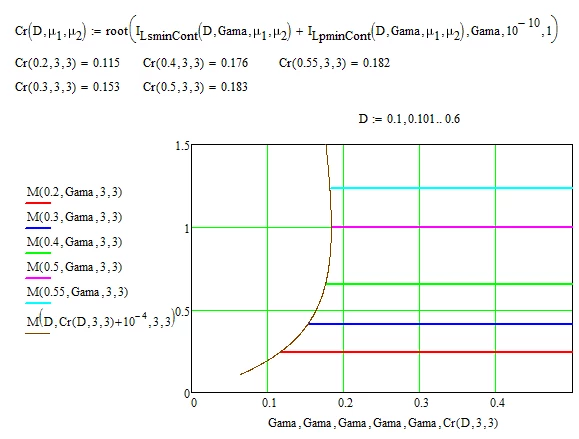
When you are talking about an "x" value you actually mean the Gama value, right?

The following should help (worksheet attached:

B.png


2 replies

Werner_E25-Diamond IAnswer
25-Diamond I
May 17, 2018

The way you use the break operator does not make sense.

break ist meant to exit loops and programs The break operator halts execution of the current loop and returns the last value calculated.

You should rather use something like :

...

NaN  otherwise


When you are talking about an "x" value you actually mean the Gama value, right?

The following should help (worksheet attached:

B.png


gdeflima1-VisitorAuthor
1-Visitor
May 18, 2018

That was a great solution. You saved my time and my peace. I am SO THANKFULL, really.
I was about to lose hope and was gonna migrate to Matlab where I know how to work with vectors, and "for" structures more easily. I was gonna sweep the function M  until I would find a Gama. But still, it would take so much time.
You seem to be very expierenced on Mathcad and I hope one day I can be as helpfull as you are.

By the way, the real curve that I wanted to plot is this one:
Capture.JPG

 That's why I needed to find the "Gama" Value. The curve that defines the region is fantastic and improves much more the plot.