5-Regular Member
January 25, 2023
Solved

Footer formatting gets lost when file is closed

  • January 25, 2023
  • 1 reply
  • 1272 views

When I have a filename in my document footer that is longer than the width of the page, the filename runs off the side of the page. To fix this, I have to make the text smaller so that the grab bar on the right side of the text window is visible, drag it to within the margins of the page, then reset the text to original size. The problem is that this setting doesn't get saved when the document is closed. Every time I open the file it's back to running off the page. Is there anything I can do about this, or is there any way I can report this to PTC as a bug? The attached image shows how it's supposed to look at the top and how it looks every time I open the file at the bottom. I'm also attaching my .mcdx file in case that's helpful at all.

Mathcad Prime 8.0.0.0

Best answer by terryhendicott

Hi,

Can think of two workarounds;


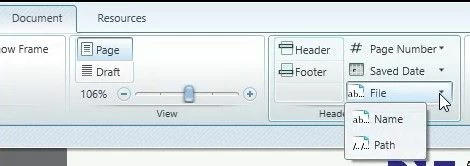
1) Just use the filename not the long \full path.

Capture.JPG


2) Use a text box CTRL+T in the footer and cut and paste the full path and filename from windows explorer.

This will save the formatting but won't adjust if you save somewhere else or change filename.


Cheers

Terry

1 reply

21-Topaz II
January 25, 2023

Hi,

Can think of two workarounds;


1) Just use the filename not the long \full path.

Capture.JPG


2) Use a text box CTRL+T in the footer and cut and paste the full path and filename from windows explorer.

This will save the formatting but won't adjust if you save somewhere else or change filename.


Cheers

Terry

5-Regular Member
January 25, 2023

Thank you for the suggestions. The second one unfortunately won't work because we reuse these calculations frequently and there's no way we can rely on everybody using them to remember to update the footer 100% of the time. I may end up going with your first suggestion, though. It's preferable for us to have the whole path, but I think we could maybe get by with just the filename since the project info is in the header.