4-Participant
December 27, 2022
Solved

Format of matrices

  • December 27, 2022
  • 2 replies
  • 2339 views

After migrating from MathCad 15.0 to MathCad Prime 8.0, I have a matrix in one sheet formatting exactly as I want it like this:
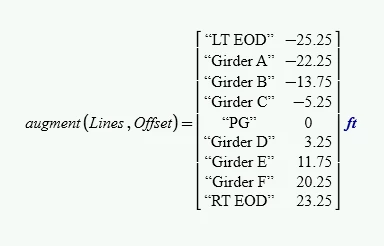
MI_8700287_0-1672178732810.png

However, in a very similar sheet, also migrated to Prime 8.0, the format has changed to this:
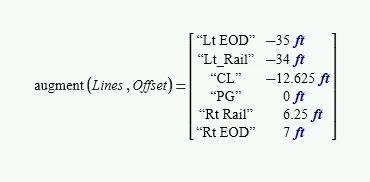
MI_8700287_1-1672178880465.png

The matrix will not display if I attempt to move the "ft" unit outside the matrix.  It is not a big deal for something small like this, but for a larger matrix, as below, it becomes cumbersome to get it to print.

MI_8700287_2-1672178974109.png

The matrix here is built the same way as the first image using the "stack" and "augment" functions, and the error message that pops if I attempt to format like the first image is "This value must be a scaler or a matrix."


What can I do to format a matrix to get rid of the units for each individual value, and apply it to the overall matrix as I have in the very first image, just like MathCad 15.0 used to do?


 

Best answer by Werner_E

I already noticed and edited my previous reply why you sometimes see the desired display even in Prime. Its only after conversion. Whenever you recalculate the sheet either by pressing F5 or F9 or if you force recalculation because you change values, the display of the matrix turns into the one you dislike.


Here is something which might be a (not at all perfect and quite clumsy) workaround. It would be needed to modify the strings in "RowLabel" (isn't it rather ColumnLabel?) so their width fits the width of the data column. Really uncomfortable and honestly I won't be willing to jump through that ring 😉

Werner_E_0-1672185250181.png
Werner_E_1-1672185263906.pngTo access the data values you would have to use something like

Werner_E_2-1672185309212.png

I guess you would rather like to live with the wide display with it many units ...


2 replies

23-Emerald IV
December 27, 2022

The unit placed after the Matrix should indicate that that unit applies to ALL elements of the matrix. With your first matrix that cannot (or should not) be, because it contains (only) strings in the first column, and strings do not (should not) have a unit attached.

I think this construct exists due to a flaw in the conversion process.

I guess this explains why you cannot alter the unit position in your other matrices.


Success!
Luc

25-Diamond I
December 27, 2022

I can confirm that real  Mathcad used to give the result you ant to see and I also second what Luc said, namely that this behaviour wasn't quite correct because a unit should bot be applied to a string . As you can see in the last expression, MC15 is handling that augmented matrix somewhat inconsistent as it would not allow to get rid of the unit in the first string column:

Werner_E_0-1672182302813.png


When I converted the above sheet, the result was the one you dislike. I wonder what we have to do to get the result in prime your first picture is showing.

EDIT: NO, I don't wonder anymore. If you open the converted sheet the first time, you see what real Mathcad would have shown (the display you demand). But as soon as the sheet is recalculated, the other (correct, but not desired) display shows up.

I guess that in Prime you can't get the result you'd like to see. To save space you may get rid of the units altogether by dividing the second vector/matrix by the unit (feet) before you augment the two.

Strings in a matrix with units can be even worse as you are not able to change the displayed unit (lets say from feet to meter or yards) as long as the unit is displayed insider the matrix (which is necessary if not all elements share the same unit).

Ingalls4-ParticipantAuthor
4-Participant
December 27, 2022

It would be pretty fantastic to have the display work the way old MathCad did.

I had thought about dividing the equation by the unit, as well, but I do reference this sheet where I need the unit to complete my next steps.


I also get that you can't change the units inside that stacked or augmented matrix, which also really sucks.

In the sheet I have attached, it is a bit of a mess, but I think you'll get the idea.  Also, I set the origin for my matrices to "1", not "0".  I'm not sure if that stays with the sheet, or if you may need to change it when you open it.


Thanks for the assistance.

Werner_E25-Diamond IAnswer
25-Diamond I
December 27, 2022

I already noticed and edited my previous reply why you sometimes see the desired display even in Prime. Its only after conversion. Whenever you recalculate the sheet either by pressing F5 or F9 or if you force recalculation because you change values, the display of the matrix turns into the one you dislike.


Here is something which might be a (not at all perfect and quite clumsy) workaround. It would be needed to modify the strings in "RowLabel" (isn't it rather ColumnLabel?) so their width fits the width of the data column. Really uncomfortable and honestly I won't be willing to jump through that ring 😉

Werner_E_0-1672185250181.png
Werner_E_1-1672185263906.pngTo access the data values you would have to use something like

Werner_E_2-1672185309212.png

I guess you would rather like to live with the wide display with it many units ...