1-Visitor
May 9, 2015
Solved

Function Variable with Condition Statement

  • May 9, 2015
  • 2 replies
  • 2289 views

Hi

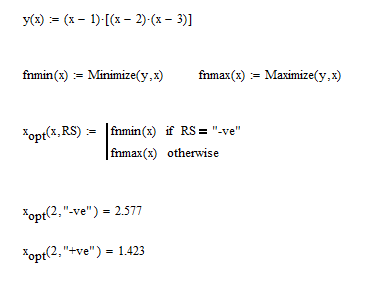
I couldn't understand why the function with condition statement in this case IF statement as shown below dose not work properly

Function Variable With If.JPG

Is this right way ? or I am making some mistake.

BR,

J.Randeep

Best answer by AlanStevens

Here's a workaround in M15:

minmax.PNG

Alan.

2 replies

rjaison1-VisitorAuthor
1-Visitor
May 9, 2015

P:S

On the other hand if i just use Maximize or Minimize manually according to the condition with out any condition statement it works correctly

24-Ruby IV
May 9, 2015

I think it is a bug in Mathcad 15. In Prime OK:

minmax.png

rjaison1-VisitorAuthor
1-Visitor
May 9, 2015

Hi

Thanks for your insight.

Unfortunately I am using Math CAD 15 I need to find a solution that works with it.

If you are certain it is a bug, Math CAD support team should be notified about this?

J.Randeep

24-Ruby IV
May 9, 2015

Randeep Jaison wrote:

If you are certain it is a bug, Math CAD support team should be notified about this?

J.Randeep

It is not a bug. It is one methodology of the soft.

If(a=b, m, kg) - a bug in Mathcad 15 but not in Prime.

Can you use in your case y(x) or -y(x) for the finding min or max?