1-Visitor
August 24, 2017
Solved

Functional Solve Block

  • August 24, 2017
  • 2 replies
  • 5956 views

Hi


I was trying to develop a function to calculate flow depth in D-shaped Tunnel. My attached sheet calculates correctly for First Tunnel section. However for second tunnel, It is giving wrong result. In fact it is not changing parrments of tunnel, which I intend to.


please have a look at attached version 14 File.


Thanks in Advance


A. Prasun.


Best answer by Werner_E

Here you are.

As I wrote in my first answer, the problem was, that your calculations did not use the new values for B, H, etc. which you provided as function arguments and that you have to use those arguments as function arguments of Q (and all functions called by Q) as well.

Doing those changes now you get the 1.14 m you expected.

I have deleted the argument H  as it is  never used in the relevant calculations!

You also never use the functions "full" and "full_d", but if you intend to do so in the future, H should be an additional function argument.

In the pic I have underlined the changes made. The green underlined change of the name of the variable of integration is not mandatory, it will work with alpha, too. But from a mathematical point of view the variable of integration and the limit should never be the same name, especially as the limit is a function with the name alpha.
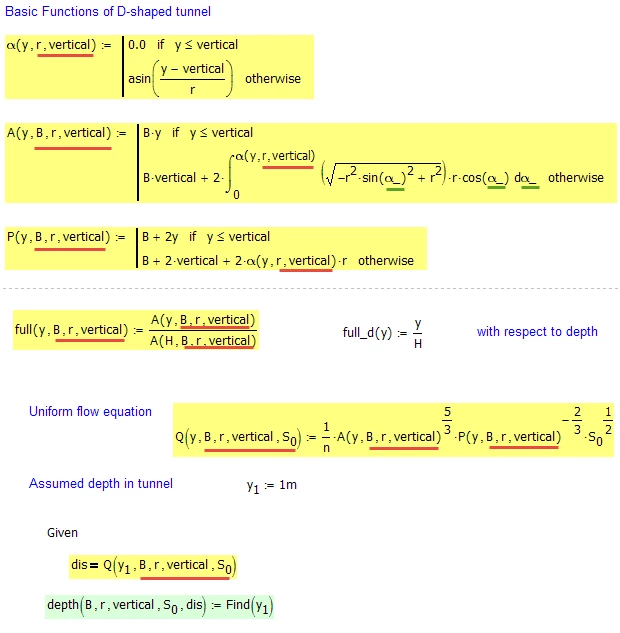
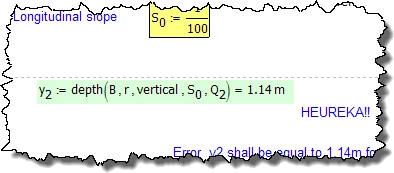
Bild1.png


 Bild2.png


2 replies

19-Tanzanite
August 24, 2017

It would be better if you posted the worksheet (you have to zip it first). Based on the pdf, I suspect the problem is the guess value. Get rid of the guess value y1:=1m before the solve block, and add y1 as an argument to the depth function. Then you can try different guess values further down the worksheet by changing the last parameter in the function call.

aprasun1-VisitorAuthor
1-Visitor
August 24, 2017

Thanks


The zipped file is attached.


A. Prasun

19-Tanzanite
August 24, 2017

Given your math, the solve block is returning the correct answer:

solve block.png

25-Diamond I
August 24, 2017

As Richard already said - its better if you attach the worksheet itself and not just a static picture or pdf.

One things I noticed ist that your function depth(..) has 6 arguments but none of the first five arguments are used! All your calculations use just the values of B,H, etc. which are defined at the top of your sheet. The only argument which really influences the calculations is the last argument "dis".

This may be the reason for the wrong result as you provide differnet values for B, H, etc when you call the function the second time, but the function still uses the values defined at the top.

You would have to make Q a function with all those arguments, too!


aprasun1-VisitorAuthor
1-Visitor
August 24, 2017

I tried inserting y1 or guess value of flow depth in function but still same issue. wrong answer.

The function is not working if i modify the variables ( change the size or slope of tunnel).

