Best answer by Werner_E

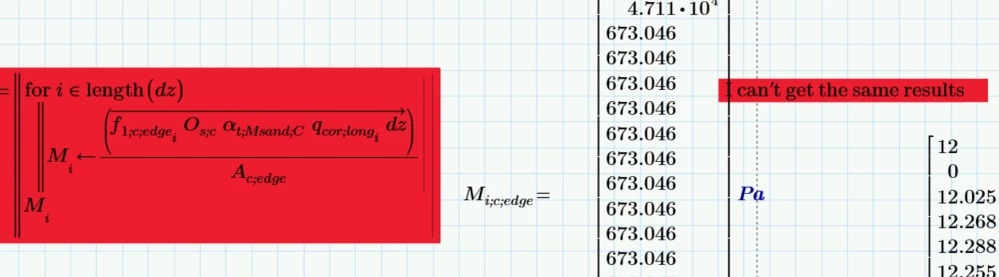
You forgot to attach the excel data file. The one you posted earlier does not have a sheet #28.


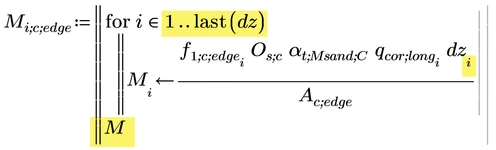
Maybe you are looking for

Werner_E_0-1728645756419.png

as I don't think that you expect a nested vector of vectors, which you would get if you omit the index i on dz. Vectorization isn't necessary anyway.


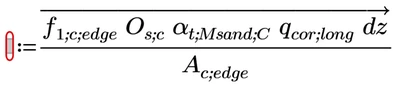
EDIT: An easier way to achieve the same result would be

Werner_E_0-1728648064258.png

but it fails because vector dz has one element less than the other two vectors involved.

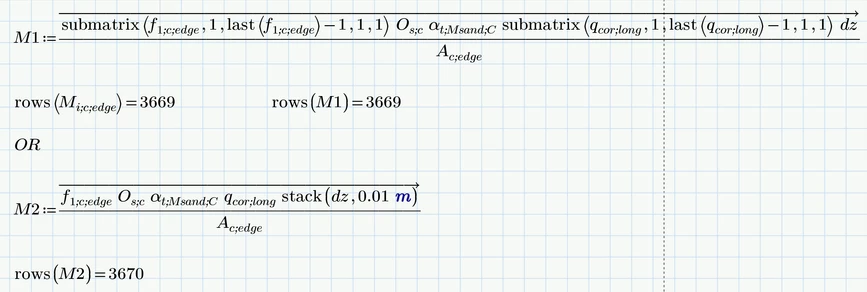
So you would have to make all three involved vectors equal in length, either by getting rid of the last elements in f.1... and q.cor... using submatrix (this gives the very same result as the program shown) or add an additional 0,01m at the end of dz (which results in in a vector M2 one element larger).

Werner_E_2-1728648633554.png


2 replies

Werner_E25-Diamond IAnswer
25-Diamond I
October 11, 2024

You forgot to attach the excel data file. The one you posted earlier does not have a sheet #28.


Maybe you are looking for

Werner_E_0-1728645756419.png

as I don't think that you expect a nested vector of vectors, which you would get if you omit the index i on dz. Vectorization isn't necessary anyway.


EDIT: An easier way to achieve the same result would be

Werner_E_0-1728648064258.png

but it fails because vector dz has one element less than the other two vectors involved.

So you would have to make all three involved vectors equal in length, either by getting rid of the last elements in f.1... and q.cor... using submatrix (this gives the very same result as the program shown) or add an additional 0,01m at the end of dz (which results in in a vector M2 one element larger).

Werner_E_2-1728648633554.png


14-Alexandrite
October 13, 2024

Thank you Werner

23-Emerald V
October 13, 2024

No problem, Yusra. Werner had given you the answer and I’d meandered the rest of the thread off into something totally unrelated, anyway. 🙂


Stuart

23-Emerald V
October 11, 2024

Hello, Yusra.


Could you please upload your latest version of "CPT input gef.xlsx"?  The version I've got creates errors when it tries to read range "[28]A2:D2196".


However, looking at your program, I'm wondering why you return Mi instead of M? 


Stuart

25-Diamond I
October 11, 2024

For testing purposes you may replace [28] by [27] in range6 or delete range6 altogether

23-Emerald V
October 11, 2024

Deleting Range 6 (or, rather, ignoring it by changing the in range) didn't work for me.  There are references to it later in the worksheet, and I felt that it wouldn't be a good use of my time to hunt for any other potential errors that might pop up.


I'll try using 27.  Sounds good.


Stuart