
1-Visitor
Oct 13, 2014 9:16 AM UTC
Solved

Graphs in Mathcad prime 3.0

Hi all,

Thanks is advance.

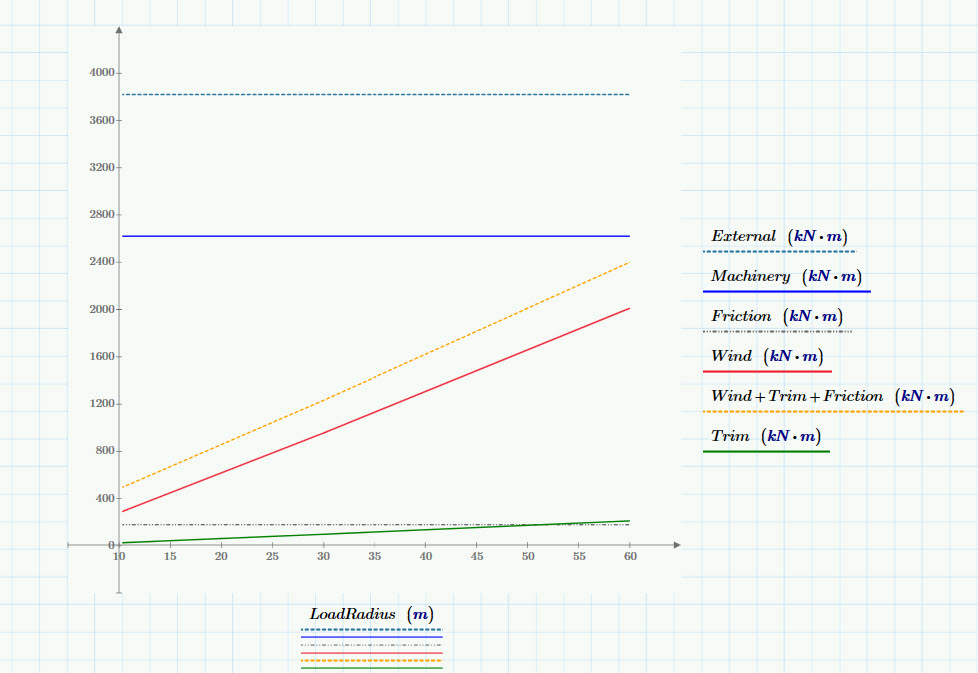
I am making a graph for moments vs load radius..My Load radius start at 10.3m and hence the graph lines also start at that point (the vertical line in the document). But I want those lines to start from zero ( I mean y axis). How can I do so?

I am making these plots against LoadRadius, Rw which has three values in a matirx but my other variables just has one constant value. So how can I put these constant value against three load radius, which will utimately produce a straight horizontal line. Here in the graph I have used a technique writing Friction= C*Rw/Rw which is not smart way I think.

I am using mathcad prime 3.0

Best Regards

Jahangir Hossain
tdevarajAnswer
1-Visitor
Oct 13, 2014 10:33 AM UTC

Hi Jahangir

If its purely cosmetic then you have the option of moving the axis.

Just select the axis of interest and drag it to the new position required

Unless the data value exists it won't be plotted...you would need to account for the 0 values in your data vectors.

graphimage.jpg

Thomas

10 replies

1-Visitor
Oct 13, 2014 9:39 AM UTC

Jahangir Hossain wrote:

Hi all,

I am making a graph for moments vs load radius..My Load radius start at 10.3m and hence the graph lines also start at that point (the vertical line in the document). But I want those lines to start from zero ( I mean y axis). How can I do so?

Your graph is plotted against LoadRadius (R.w) which starts from 10.3m, so it will not start from zero. You could make your functions dependant on R.w and define that as a range variable, but your vectors Wind and Trim only have 3 values realting to R.w, so these would need to interpolated.

I don't really understand why you are trying to start these lines at zero.

Translate
jhossain1-VisitorAuthor
1-Visitor
Oct 13, 2014 9:59 AM UTC

Thanks mike...

I am trying to start those lines at zero just because of representations(looking good).

Translate
1-Visitor
Oct 13, 2014 10:15 AM UTC

Have a look at the attached. Sorry for the brute force method, but I haven't got the much time at the moment.

Translate