1-Visitor
January 3, 2022
Solved

group items and sort table

  • January 3, 2022
  • 4 replies
  • 2481 views

Hi to all.
I have tables with many elements which I must group according to type and sort them in ascending order based on column 2 of the table in the example file. I have tried to generate a small code but I do not get the desired result.

I hope you can help me.
I attach the file in mathcad Prime with an example of what I want to get.

In advance thank you very much for the help.

Best answer by LucMeekes

Here's a function that will do the job:

LucMeekes_0-1641219236954.png

The first parameter is the matrix you want to sort, the second parameter is the list of columns you successively want to sort on.

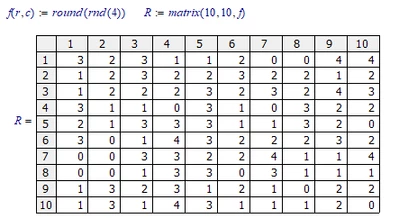
Example. Create a matrix with random numbers:

LucMeekes_1-1641219334603.png

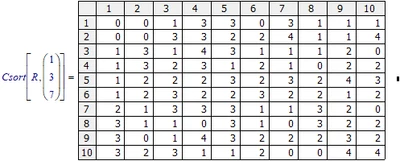
Sort it on columns 1, 3 and then 7:

LucMeekes_3-1641219375076.png

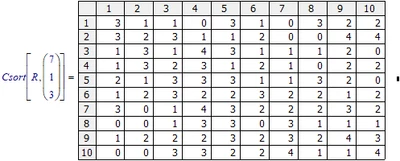
Or sort it on column7, then 1, then 3:

LucMeekes_4-1641219437910.png

Note that the function will work with matrix elements being strings or scalars only.


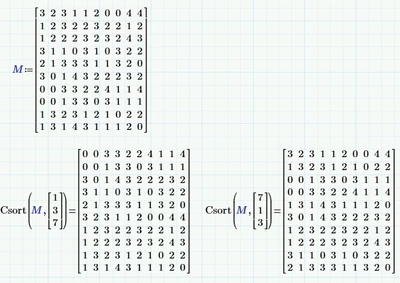
The same function in Prime (but with ORIGIN=0):

LucMeekes_0-1641245913964.png

Prime 4 file attached.


Success!
Luc


4 replies

23-Emerald IV
January 3, 2022

You have set ORIGIN=1, so matrix indexes start at 1 (not the default 0). I suppose your 'column 2' of the table is the one labelled 'Col 1' , so its index is 2.


Have you tried

   csort(Table1,2)

To sort the entire table on the second column?


I see that you want the table sorted on column 1, and next on column 2.

Now the problem is that while csort does a good job of sorting on one column, if you subsequently sort the resulting sorted table on another column, the first sorting is lost.

The quickest solution to do the sorting of the table you want, is to do it in Excel.

Success!
Luc

21-Topaz II
January 3, 2022

Hi,

Can be done with following steps.

Capture.JPG

23-Emerald I
January 3, 2022

Just an observation:

     EXCEL (in the embedded table) could do this sorting by tipe, then by column 1, in one single operation.  No code required.

LucMeekes23-Emerald IVAnswer
23-Emerald IV
January 3, 2022

Here's a function that will do the job:

LucMeekes_0-1641219236954.png

The first parameter is the matrix you want to sort, the second parameter is the list of columns you successively want to sort on.

Example. Create a matrix with random numbers:

LucMeekes_1-1641219334603.png

Sort it on columns 1, 3 and then 7:

LucMeekes_3-1641219375076.png

Or sort it on column7, then 1, then 3:

LucMeekes_4-1641219437910.png

Note that the function will work with matrix elements being strings or scalars only.


The same function in Prime (but with ORIGIN=0):

LucMeekes_0-1641245913964.png

Prime 4 file attached.


Success!
Luc


BPP1-VisitorAuthor
1-Visitor
January 4, 2022

Thanks to all for the help