16-Pearl
May 13, 2022
Solved

HELP; CORRUPTED INPUT DATA FROM CSV FILE

  • May 13, 2022
  • 3 replies
  • 6238 views

Three files are attached:

DATE.csv

DATA.csv

DATE.xmcd


When reading the two csv files into the Mathcad file, the first element of the DATA file is corrupted and looks like
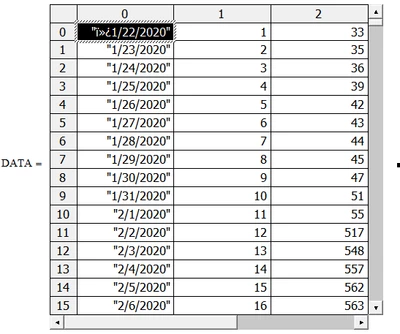
regcurry_0-1652478161678.png

However, the DATE.csv file reads in correctly as:
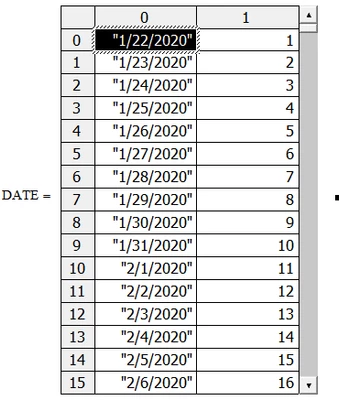
regcurry_1-1652478229071.png


What is causing the corrupted first element when reading in the DATA.csv file.


Thanks for any help provided.

Reg Curry



Best answer by terryhendicott

Hi,

Retyped the date that is first entry in the data file and this eliminated the three rogue characters.

Capture.JPG

3 replies

21-Topaz II
May 13, 2022

Hi,

Retyped the date that is first entry in the data file and this eliminated the three rogue characters.

Capture.JPG

regcurry16-PearlAuthor
16-Pearl
May 13, 2022

👍

Thanks much.

23-Emerald IV
May 14, 2022

Your problem occurs because there is actually some data in front of the first date, in the DATA file.

I read the first 16 bytes of each file to show:

LucMeekes_1-1652510286983.png

Note that 49 is the ASCII character "1", that's where the date starts.

Whatever you used to generate those .CSV files, has put those extra bytes with values 239, 187 and 191 in front of the first date.


Success!
Luc


regcurry16-PearlAuthor
16-Pearl
May 14, 2022
Thanks. That’s the problem. The data starts a day 50 instead of day 0. I’ll fix that.

Thanks again.🙏🏼
24-Ruby III
June 12, 2022

Hi,

I did not read all replies ... so I am not sure whether following information is new for you.

I opened both csv files in Notepad++.

DATE FILE.csv ... file format is UTF-8

MartinHanak_0-1655015449842.png

CDC COVID-19 DATA.csv ... file format is UTF-8-BOM ... this explains 3 "invisible" characters at the beginning of the file

MartinHanak_1-1655015615579.png

CDC COVID-19 DATA.csv ... file size = 31 239 bytes


SOLUTION

In Notepad++

  • create new file
  • select the entire contents of the file CDC COVID-19 DATA.csv using CTRL+A
  • copy selection into clipboard using CTRL+C
  • copy clipboard contents into new file using CTRL+V
  • save new file as new CDC COVID-19 DATA.csv
  • new CDC COVID-19 DATA.csv ... file format = UTF-8 ... files size = 31 236 bytes (3 "invisible" characters were removed)
  • import new CDC COVID-19 DATA.csv into Mathcad


regcurry16-PearlAuthor
16-Pearl
June 12, 2022

Thanks; however, since I do this frequently I found another solution.  I left the headers in the original file and used submatrix to omit the header rather than deleting that first row.  It solved the problem.  For some reason, deleting the header row introduced the problem.  Not sure why it never did that months ago.