1-Visitor
April 2, 2019
Question

Help "These units are not compatible"

  • April 2, 2019
  • 7 replies
  • 3944 views

Hi , I am trying to solve this equation and it seems it can't be solved because of both "1" from the equation. Could you please help me find what units should i attribute to that values of "1" ? Thanks.
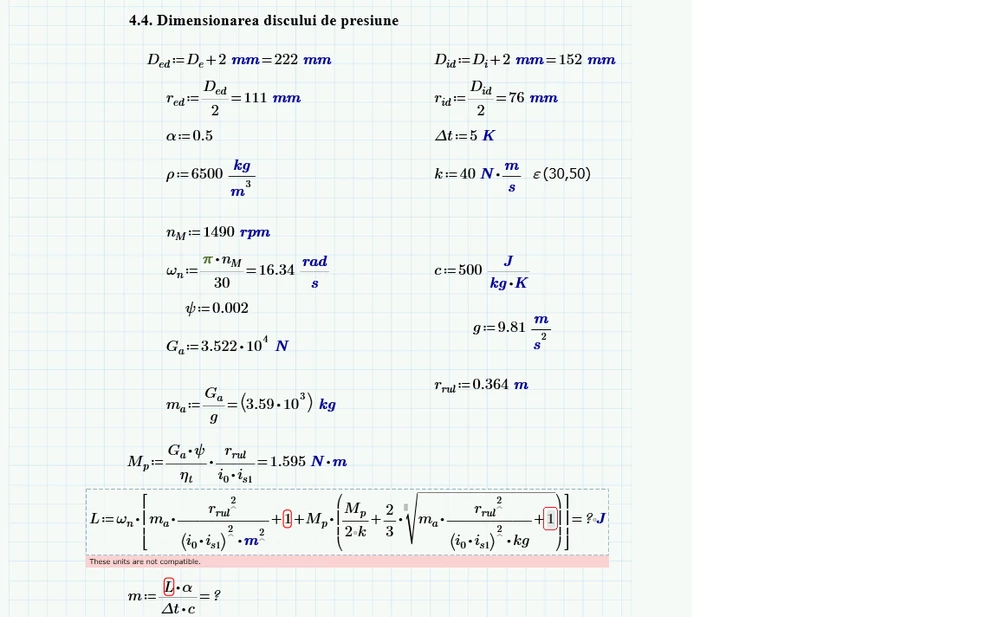
 

save me.png

7 replies

25-Diamond I
April 2, 2019

The unit of the two 1's must be the same as the unit of the other summand in the sum they occur.

For further help you would have to attach your worksheet.

Jokerul11-VisitorAuthor
1-Visitor
April 2, 2019

Thank you for your response. I still can't find the right units. I've attached the worksheet and the equation is on the last page. Please help me .

25-Diamond I
April 2, 2019

There are a lot more unit mismatches in your expression.

As it looks you are using an empirical formula which usually are not unit aware but rather from the form "if you put in a in meter and b in millimeter you get the area in square feet -> A = a*b".

The best way to deal with formulas of this kind is to get rid of all units by using variable/(expected unit) and then add the resulting unit.

In the example above: A:= a/m * b/mm * ft^2

You may use variable/UnitOf( variable) but this gives you no control over the unit you divide with.


In your case it would look something like this:

B.PNG

1-Visitor
June 3, 2019

Yes the unit of 1's  must be same because unit of other sum and also for the sum they occur mykfcexperience

1-Visitor
August 9, 2019

 "If you put in an in meter and b in millimeter you get the area in square feet -> A = a*b".

The best way to deal with formulas of this kind is to get rid of all units by using variable/(expected unit) and then add the resulting unit https://tellthebelll.us you will definitely get your answer.
