
1-Visitor
April 25, 2019
Solved

Help "This Value must be a scalar"

  • April 25, 2019
  • 3 replies
  • 4252 views

I understand that my S 2 and L x are both defined as vectors.  I’m using a comparison operator (<) that compare scalars, not vectors.  I have no clue how to make an if/else if statement work.  Any assistance or advice would be extremely appreciated.
Best answer by terryhendicott

Thanks Werner.


We can go one more step to clarity by simplifying the arguments.

Capture.PNG

3 replies

24-Ruby IV
April 25, 2019

Bug in Prime? We must check in Mathcad 15!

bugif.png

21-Topaz II
April 25, 2019

Hi,


Enclosed is one way of doing it.  S2 is a constant now.

Capture.PNG

25-Diamond I
April 25, 2019

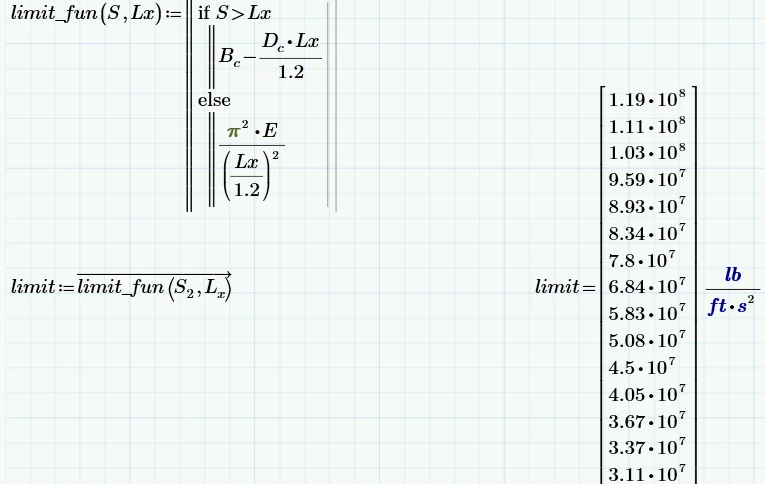
I would prefer turning all calculations. which later should deal with vectors, into functions of scalars and call these functions later vectorized with the appropriate vectors as arguments:

B.png

BTW, you don't need the "else if" statement, a simple "else" is  all thats needed.

Worksheet in P5 format attached.


21-Topaz II
April 25, 2019

Thanks Werner.


We can go one more step to clarity by simplifying the arguments.

Capture.PNG

25-Diamond I
April 25, 2019

Good idea! I had no looked at how Lx was defined and so did not notice the the expression was calculated three times from anew.

We still miss in Mathcad and Prime the option of turning a whole worksheet into a function with appropriate in- and outputs. Turning all calculations into function as I had suggested sure is the cleanest method from a math point of view but can get very clumsy and uncomfortable for more complicated worksheets.