1-Visitor
February 21, 2020
Solved

Help with output into excel component

  • February 21, 2020
  • 2 replies
  • 2101 views

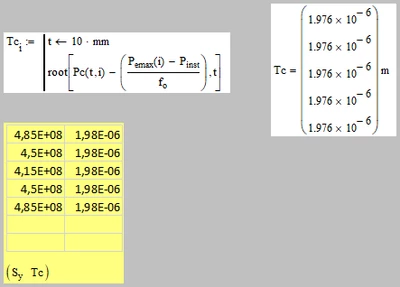
Kindly refer to attached worksheet, need advice on how to show Tc(i) as an array in excel component instead of a scalar. Would also greatly appreciate if anyone can explain how mathcad component read Tc(i) and causes a value to be shown only. 


Thank you. 


[Mathcad 15]

Best answer by Werner_E

You have to be aware that a range (like i in your sheet) is NOT a vector or an array, but some kind of implicit loop.

So Tc(i) is no array either (try to assign Tc(i) to a variable - it will fail).

Simply create a vector Tc by writing Tc[i:=.... instead of defining a function Tc(i) and use Tc as input for the Excel table.

Werner_E_0-1582269037716.png

Oh, I see that Luc was faster. Had not seen his answer when I began typing.


2 replies

23-Emerald IV
February 21, 2020

Instead of defining Tc as a function, define it as an array Tci,

then you can call Tc instead of Tc(i) in the excel component.


Success!

Luc

1-Visitor
February 22, 2020

Thank you

Werner_E25-Diamond IAnswer
25-Diamond I
February 21, 2020

You have to be aware that a range (like i in your sheet) is NOT a vector or an array, but some kind of implicit loop.

So Tc(i) is no array either (try to assign Tc(i) to a variable - it will fail).

Simply create a vector Tc by writing Tc[i:=.... instead of defining a function Tc(i) and use Tc as input for the Excel table.

Werner_E_0-1582269037716.png

Oh, I see that Luc was faster. Had not seen his answer when I began typing.


1-Visitor
February 22, 2020

Many thanks!