1-Visitor
March 9, 2015
Solved

Hiding calculation regions

  • March 9, 2015
  • 2 replies
  • 11837 views

I am trying to hide a calculation region how is that done?

Best answer by llourenço

Hi there,

What version of MathCad you are using?

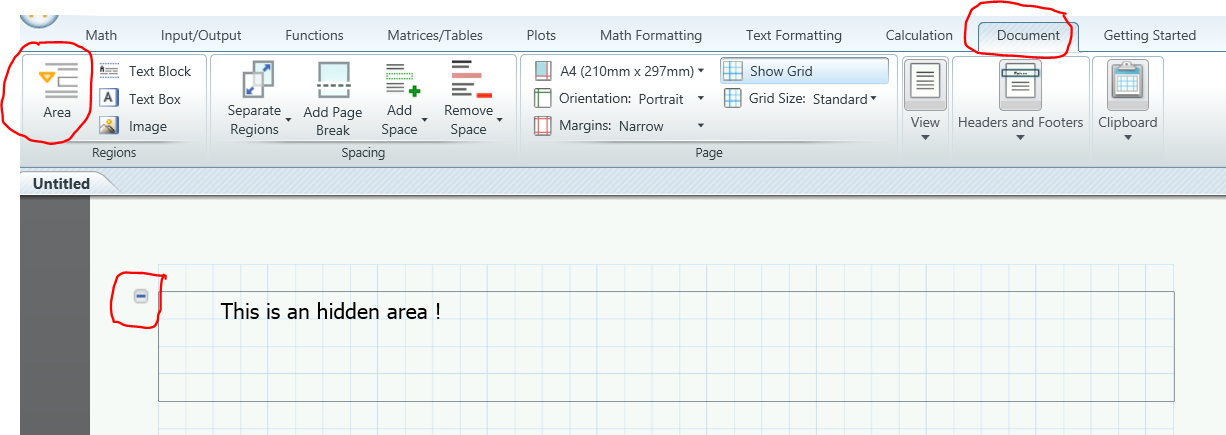
If the version is prime, you can add an hiding section in the following menu:

Document -> Area or just type CTL + SHIFT + A

Then make your calculations and press (minus) at left corner of area. And the area will be hidden.

Plese check picture attached:
Capturar.PNG

Regards,

LL

2 replies

1-Visitor
March 9, 2015

Hi there,

What version of MathCad you are using?

If the version is prime, you can add an hiding section in the following menu:

Document -> Area or just type CTL + SHIFT + A

Then make your calculations and press (minus) at left corner of area. And the area will be hidden.

Plese check picture attached:

Capturar.PNG

Regards,

LL

1-Visitor
March 15, 2015

Thank you so much, it works great.

Sergio Valles

24-Ruby III
March 10, 2015

In Mathcad 15 you need to select in main menu "Insert" -> "Area". But unlike Prime version you can set a password on a hidden area (right click on area and select "Lock").

Pic_1.png

Pic_2.png

1-Visitor
March 15, 2015

Thanks for the response.

Sergio Valles