1-Visitor
February 17, 2016
Solved

Hiding parts of my calculations

  • February 17, 2016
  • 3 replies
  • 11655 views

Hi!

Do anyone know if its possible to hide parts of my calculations? I solved an equation and got some ugly looking, precise answers. I only want to show the approximate decimal answers. 

Thanks.

Best answer by RichardJ

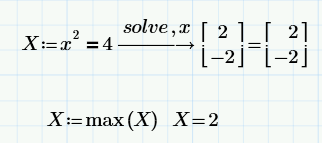
Add a numeric assignment at the start of the expression, and then use the max function:

3 replies

19-Tanzanite
February 17, 2016

More information would be useful. Which version of Mathcad are you using? Are these the results of a symbolic evaluation?

1-Visitor
February 17, 2016

I'm using mathcad prime 3.1.

I'm quite new at Mathcad, so it's probably a stupid question.

If it's possible i want to hide the answer part with the sqrt.

24-Ruby IV
February 17, 2016

It is possible in Mathcad 15

1-Visitor
February 17, 2016

Also got another question for you.

Does 1.797 got a name now? Like h2 or something? Or is it possible for me to name the biggest value h2 automatically?

Trying to make some pages of calculations where i don't have to type in the values manually.

Sorry if it's hard for you to understand my English.

RichardJ19-TanzaniteAnswer
19-Tanzanite
February 17, 2016

Add a numeric assignment at the start of the expression, and then use the max function:

1-Visitor
February 18, 2016

Thank you!
Quite helpful!

25-Diamond I
February 17, 2016

According the need to hide that big and ugly expression you got using the symbolics: Is it necessary for your audience to to see the first part, that is the equations and the "solve h" ?

If not, you could assign the calculation to a variable h, similar to what Richard had done with X, and put the whole calculation line in a so called "area" (Menu: Document - Regions:Area). You then can collapse that area and all you see is a plus-symbol at the left side and a horizontal line. After that area type "h=" and all you see is the calculation result.

And if you just want to exclude the calculation when you print the worksheet, you can put the calculation to the right hand page - what you place there is not printed.

WE