

8-Gravel
April 24, 2023
Solved

highlight smallest non zero value from table in mathcad

  • April 24, 2023
  • 3 replies
  • 1861 views

Hi,

can someone please help me?

I want to find minimum non-zero value, in col B and its respective values in col A & C.


Thanks in advance.


Best answer by Werner_E

As you are asking for a solution in Mathcad (I assume that you mean Prime), you should show the data format in Mathcad, not a screenshot of a Excel spreadsheet.

And you sure should attach your worksheet with the data.


Its a difference if the data is provided as a matrix in Prime or in a Prime table. The latter would basically mean that the data is in three different columns.


If that's the case, a solution could be
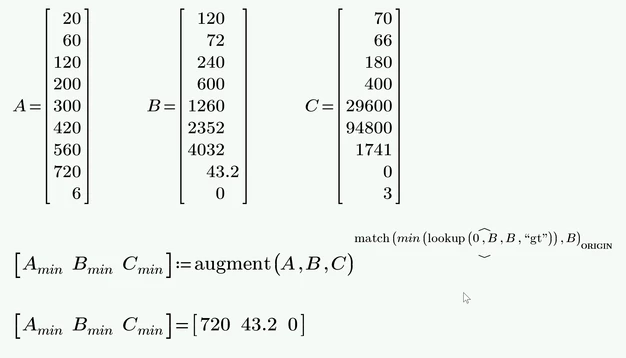
Werner_E_0-1682332448308.png


If the data is in one whole matrix like in Terry's sheet (which I had used   to avoid having to retype the data), a similar solution is possible using the column selector
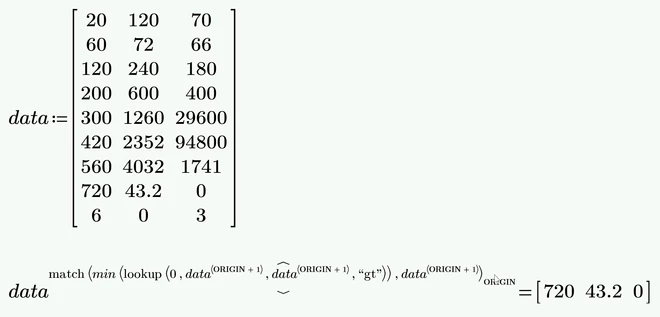
Werner_E_1-1682330396357.png

Of course you could replace ORIGIN by the value used in your sheet (possibly 0) to make the expression look  a bit less ugly

Werner_E_4-1682330585526.png


Its actually a 4-step procedure as well 😉
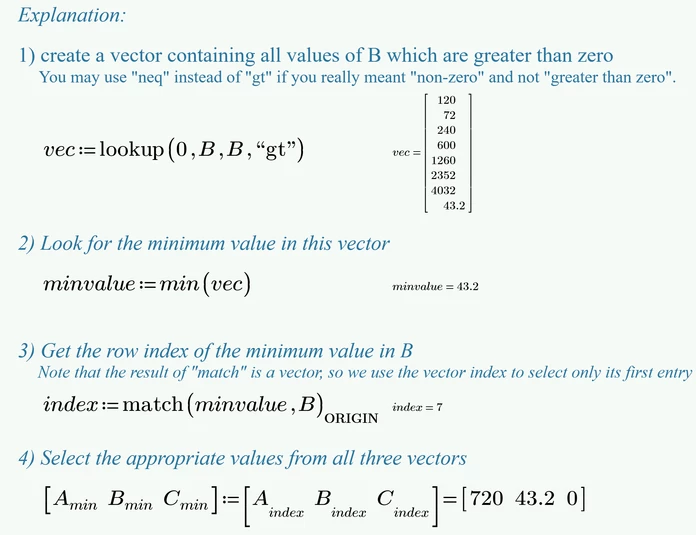
Werner_E_5-1682332248631.png


P9 worksheet attached

3 replies

21-Topaz II
April 24, 2023

Hi,

It can be done in four steps

Capture.JPG

Cheers

Terry

Werner_E25-Diamond IAnswer
25-Diamond I
April 24, 2023

As you are asking for a solution in Mathcad (I assume that you mean Prime), you should show the data format in Mathcad, not a screenshot of a Excel spreadsheet.

And you sure should attach your worksheet with the data.


Its a difference if the data is provided as a matrix in Prime or in a Prime table. The latter would basically mean that the data is in three different columns.


If that's the case, a solution could be

Werner_E_0-1682332448308.png


If the data is in one whole matrix like in Terry's sheet (which I had used   to avoid having to retype the data), a similar solution is possible using the column selector

Werner_E_1-1682330396357.png

Of course you could replace ORIGIN by the value used in your sheet (possibly 0) to make the expression look  a bit less ugly

Werner_E_4-1682330585526.png


Its actually a 4-step procedure as well 😉

Werner_E_5-1682332248631.png


P9 worksheet attached

ttokoro
21-Topaz I
21-Topaz I
April 24, 2023

If you are using EXCEL conpornent, only output the data cells you want.


image.pngimage.png

t.t.