
1-Visitor
March 11, 2015
Solved

How can I export an equation into a text string

  • March 11, 2015
  • 4 replies
  • 7301 views

Hi,

I have an equation that I manipulate in Mathcad and I would like to communicate the resulting expression to an acquaintance as text.

How do I copy/paste my equation as string of ASCII characters?


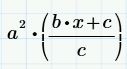
e.g. expression from math region:
example.JPG

I would like the string that I copy to look similar to this: a^2*(b*x+c)/c

The clipboard content is: "(* (^ a 2) (@PARENS (/ (+ (* b x) c) c)))"

Is this functionality not present by design?

Best answer by RichardJ

Sorry, but there is no way to do what you want.

4 replies

RichardJ19-TanzaniteAnswer
19-Tanzanite
March 11, 2015

Sorry, but there is no way to do what you want.

1-Visitor
November 11, 2020

Actually, the problem might be solvable!

Text has a perfect LISP syntax.

What you need is some kind of lisp to vba code converter as i see...

23-Emerald V
March 12, 2015

ccziezerski wrote:

Hi,

I have an equation that I manipulate in Mathcad and I would like to communicate the resulting expression to an acquaintance as text.

How do I copy/paste my equation as string of ASCII characters?


e.g. expression from math region:

example.JPG

I would like the string that I copy to look similar to this: a^2*(b*x+c)/c

The clipboard content is: "(* (^ a 2) (@PARENS (/ (+ (* b x) c) c)))"

Is this functionality not present by design?

That's interesting. I tried looking at the clipboard contents with Mathcad 14 and all I can see is an image of the equation. Is this a Prime thing or does the capability exist to show this in Mathcad 14/15?

If it's possible to paste that string into a variable, then it shouldn't be *too* hard to write a function to convert the prefix notation into infix notation.

One other way of doing it (not sure if it would work in Prime as it doesn't have components(??)) would be to Tag the region(s) containing the equation(s) of interest, do a region search (within a component) for the tag, get the regions; xml string and then convert that string (which is in prefix form, albeit heaving xml-ed) to infix notation. ... although if such a conversion function existed, then it should be just a matter of manually finding the tagged region in a text editor, copying it and pasting into a Mathcad worksheet containing the converter function.

It should really be a built-in capabilty, after all, Mathcad already knows how to do this to display the equation in the first place.

Stuart

PS. There have been many, long-standing requests to do back-and-Forth (programming joke) conversion between Mathcad's display and standard programming formats.

19-Tanzanite
March 12, 2015

That's interesting. I tried looking at the clipboard contents with Mathcad 14 and all I can see is an image of the equation. Is this a Prime thing or does the capability exist to show this in Mathcad 14/15?

It's a Prime thing.

One other way of doing it (not sure if it would work in Prime as it doesn't have components(??)) would be to Tag the region(s) containing the equation(s) of interest, do a region search (within a component) for the tag, get the regions; xml string and then convert that string (which is in prefix form, albeit heaving xml-ed) to infix notation. ... although if such a conversion function existed, then it should be just a matter of manually finding the tagged region in a text editor, copying it and pasting into a Mathcad worksheet containing the converter function.

Prime does not have tags for regions, does not have components, and the XML is full of non-printing characters (look at a .mcdx file in Notepad, and it bears little resemblance to a .xmcd file). Aside from that, what you suggest should work perfectly

PS. There have been many, long-standing requests to do back-and-Forth (programming joke) conversion between Mathcad's display and standard programming formats.

A real gem (perhaps a Ruby?) of a joke.

1-Visitor
March 13, 2015

Hope this webpage could help you, it is writen in Chinese, and use the Mathcad15, and I don't try it in Mathcad Prime.

使用SMath和Excel做到Mathcad文件和文本文件之间的互译_mathcad吧_百度贴吧

1-Visitor
December 22, 2023

I spent a lot of time trying to make it work.

_10158245_0-1703244718748.png

There are still some roughnesses, but it's really looks right

Code in txt