
1-Visitor
October 23, 2015
Solved

How can I import data ?

  • October 23, 2015
  • 9 replies
  • 6541 views

Dear Mathcad Professors

I am a student. I am going to study Matcad S/W and I have a problem.  

The problem is that I don't know to import data according to any data varidation.

For example)

Excel 

A=250~500,   B= [ 1, 2, 3, 4, 5]

A=100~250,   B= [ 1, 3, 5, 7, 9]

A=0~100,   B= [ 0, 1, 2, 3, 4]

If I need to import these data to Math-cad S/W acorroding to 'A' data variation 

How can I do?

I sincerly need to help. Thank you for reading my question

Best answer by Werner_E

Fortunately you are not using Prime 3.1, so I could read your file.

The attached file of mine is in Prime 3.0 format. So if you use Prime 2, you won't be able to open it and have to resort to the attached pictures.

Maybe something like the following does what you want?

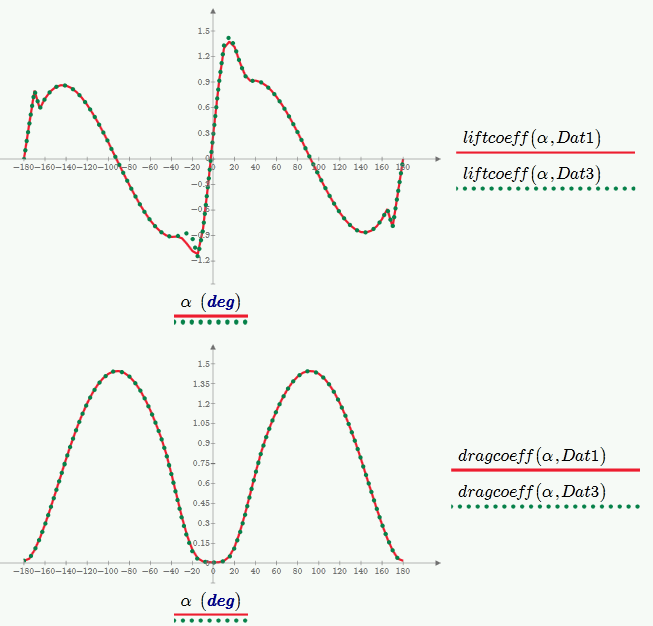
I also added a function to return lift and drag values for a given angle using linear interpolation. Guess the table refers to the dimensionless lift and drag coefficients.

Regards Werner

EDIT: Added plots for lift and drag - comparing the tables for different Reynold numbers:

9 replies

24-Ruby IV
October 23, 2015

Sorry, what is it Mathcad S/W?

One simple with Mathcad 15:

copy.png

23-Emerald V
October 23, 2015

jinsuk Lee wrote:

Dear Mathcad Professors

I am a student. I am going to study Matcad S/W and I have a problem. 

The problem is that I don't know to import data according to any data varidation.

For example)

Excel

A=250~500,   B= [ 1, 2, 3, 4, 5]

A=100~250,   B= [ 1, 3, 5, 7, 9]

A=0~100,   B= [ 0, 1, 2, 3, 4]

If I need to import these data to Math-cad S/W acorroding to 'A' data variation

How can I do?

I sincerly need to help. Thank you for reading my question
I presume by "S/W" you mean "software"?  Do you know which version of Mathcad you intend to use (do use?)? There are two major families of Mathcad: Mathcad Prime (the latest version being Prime 3.1) and the older non-Prime Mathcad (Mathcad 15 being the latest version). 

There are several ways to import Excel data into Mathcad.  The READEXCEL function is probably the most versatile.   Many people find the Excel component to be the most convenient, though.

In your example, are both A and B in Excel?  Do you calculate B from A within Excel? Are the 3 ranges in different Excel workbooks or worksheets or are they all on the same worksheet?  Could you post a example workbook(s) to give a clearer idea of what you want?

If you want to select the B data given A's value, then you may find it easier to import all of B from Excel and then select the values you want from the A values.  For example, (assuming you have read B in from the Excel file):

Stuart

jlee-21-VisitorAuthor
1-Visitor
October 26, 2015

First, Thank you for your consideration.

I use Mathcad-prime.

I attached my file.

thak you for my reading question

Werner_E25-Diamond IAnswer
25-Diamond I
October 26, 2015

Fortunately you are not using Prime 3.1, so I could read your file.

The attached file of mine is in Prime 3.0 format. So if you use Prime 2, you won't be able to open it and have to resort to the attached pictures.

Maybe something like the following does what you want?

I also added a function to return lift and drag values for a given angle using linear interpolation. Guess the table refers to the dimensionless lift and drag coefficients.

Regards Werner

EDIT: Added plots for lift and drag - comparing the tables for different Reynold numbers:

12-Amethyst
October 24, 2015

There are also a problem with the international specification. You can see that seven is paste as number, but others as string. You can change the decimal comma by a dot somewhere in windows settings, in "international settings" (not in excel), and try again to copy and paste.

24-Ruby IV
October 24, 2015

AlvaroDíaz wrote:

There are also a problem with the international specification. You can see that seven is paste as number, but others as string. You can change the decimal comma by a dot somewhere in windows settings, in "international settings" (not in excel), and try again to copy and paste.

Yes, see please my message. I must sometimes use find "," and replace to "." and the function str2num for numbers but not strings having!

See Decimal mark - Wikipedia, the free encyclopedia

Blue - points

Green - comma

Red color - ??? (wars - Syria, Iraq, Afghanistan...)

940px-DecimalSeparator.svg.png