
1-Visitor
February 24, 2016
Solved

How do a make a multi-line titleblock in Mathcad15?

  • February 24, 2016
  • 2 replies
  • 2369 views

I'm trying to create a title block for a calculation document, but whenever I create my heading with multiple lines the lower lines don't show up in the print, only the top one. Has anyone encountered this issue before?

I've attached a little document showing the issue

Best answer by LucMeekes

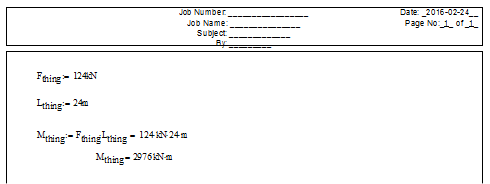
Change the top margin of your Page Setup (Menu: File => Page Setup) to a value larger than 12.7 mm/0.5 in and you'll see more of your header (and have less usable vertical space per page).

This is what you get at a top margin of 30 mm:
Success!
Luc

2 replies

LucMeekes23-Emerald IVAnswer
23-Emerald IV
February 24, 2016

Change the top margin of your Page Setup (Menu: File => Page Setup) to a value larger than 12.7 mm/0.5 in and you'll see more of your header (and have less usable vertical space per page).

This is what you get at a top margin of 30 mm:

Success!
Luc

1-Visitor
February 24, 2016

Thanks Luc!