1-Visitor
November 13, 2016
Solved

How do I correct an ODBCread and ODBCwrite error?

  • November 13, 2016
  • 1 reply
  • 2846 views

Hello,

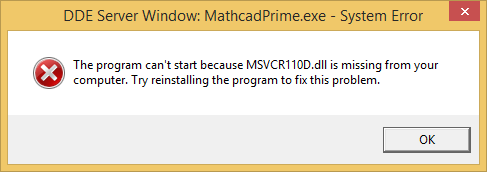
I have followed the set up instructions for the ODBCread and ODBCwrite custom functions (copying dll, dbread, and dbwrite files to the Custom Function folder) and I get the following error:


Error.png

Is there something I'm doing wrong or is there a solution for this?

Thanks,

Adrian

Best answer by AndyWesterman

Hi Adrian,

comments in windows 8 - Visual Studio 2013 MSVCR110d.dll is Missing - Super User suggest that it is a debug version.

- tricky...

as an engineer I would try an experiment (copy & rename the dll file) whether it will work who knows.

what's' the worst it can do ?

If it doesn't work, remember to undo the changes.

if not then next best is to try to obtain a copy of the mscvr110d file

- it might be available as a download; but you will need to exercise care about the source

  I don't have copy on my computer so unfortunately I can't help there.

-final option (at the moment) is that it may be part of the visual studio package

  you could try the visual studio express install , which I believe is a freeware version from Microsoft.

   If it is there it may be possible to extract the 1 file that you need.

Otherwise raise it as an issue with PTC - all the required DLL files should be supplied with the Mathcad install.

Regards

Andy

1 reply

12-Amethyst
November 14, 2016

I think that this means you don't have the Microsoft visual c runtime files.

either type mscvr110 into google or head over directly to the Microsoft website to download the appropriate installation files.

Regards

Andy

acharest1-VisitorAuthor
1-Visitor
November 14, 2016

Are there any more suggestions for this?  I've uninstalled and installed the run time libraries and it still isn't working.

acharest1-VisitorAuthor
1-Visitor
November 14, 2016

Does the "D" in the .dll file correct?  Does it mean developer?