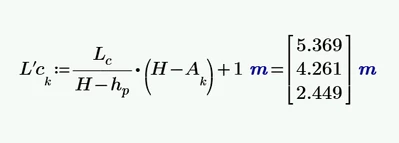
The expression with the values shown in your screenshot can't be seen in the file your attached.
But using the "min" function should effectively limit the values so all values above 4.5 m are set to 4.5 m
EDIT: Ahh! I just read that you want 4.5 m to be the minimum value. So you should use the "max" function to set all values below 4.5 m to 4.5 m. As with the values in your sheet all three results are below this threshold, all three are set up to 4.5 m.
Of course you also could use an if-statement
or also the if-function as suggested by ppal
The local variable "Result" was introduced as otherwise it would have been necessary to use the calculation expression twice, which I considered being harder to read and inefficient.
If you need to limit values more often, it might be an option to use a utility function limit(value,hi,lo) which does exactly what the name implies - the value returned will be in the range from lo to hi. This function could be hidden at the top of the sheet in a collapsed region or at the top to the right of the printable page.
It could be implemented using if-statements
or using the if-function
or using min and max functions
When you need to use it for a vector of values as in your sheet, you may either use a range variable k