
1-Visitor
March 24, 2015
Question

How do I use a solve box with range variables?

  • March 24, 2015
  • 2 replies
  • 1098 views

I have a series of equations to solve with range variables but I get a "This variable is undefined." error when using the Given/Find solve boxCapture.JPG
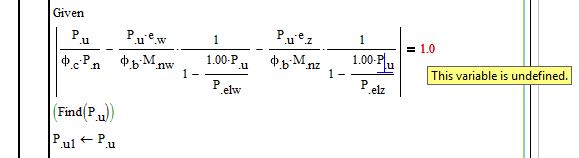
I have attached the Test worksheet and the original worksheet that demonstrates it works for a single variable

2 replies

23-Emerald I
March 24, 2015

You can't put solve blocks into a program block. You CAN define a function that runs a solve block and put that function into a program.

12-Amethyst
March 25, 2015

Hi Graham,

it took a little while to get the function to work with the solve block,

There were a few issues of missing variable & one unit error to resolve.

The solve block has been re-configured as a function, all inputs listed as parameters.

The sheet will work over a limited range of your input spread-sheet data, but if you try to run it over the whole set it still crashes.

Either there is still a problem with the method that I haven't seen - you will need to try spot checks against your single sheet.

Or there is a problem with the input data.

Either way , it is beyond my knowledge & I'll leave it up to you to fix.

Regards

Andy