
1-Visitor
September 22, 2016
Question

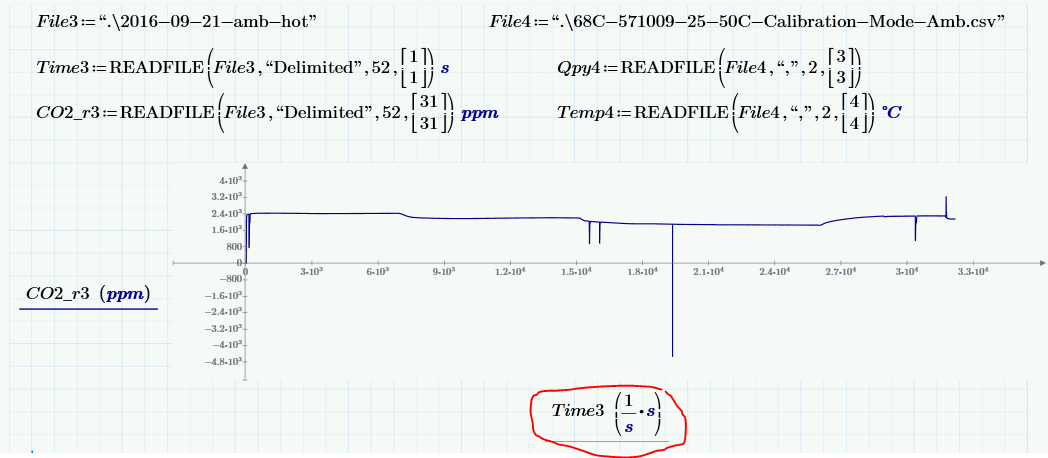
How do you get units to show up correctly in x-axis using Mathcad Prime 3.1?

  • September 22, 2016
  • 6 replies
  • 2947 views

I am able to have units show up correctly in the y-axis but when I put seconds in the x-axis, it adds 1/s to it.  Does the x-axis have to remain unitless?
6 replies

23-Emerald I
September 22, 2016

Interesting!

Try adding:

      Time3 := Time3*s

mepp1-VisitorAuthor
1-Visitor
September 22, 2016

That does seem to fix how the unit is displayed in the plot.  It is a little weird though, because it still works even if I take the unit off of the ReadFile callout.  Is this just a bug I wonder?

23-Emerald I
September 22, 2016

Apparently Prime was not assigning units in the READFILE statement.  (Odd, it assigned ppm.)

Prime does a lot of "labeling" to things: Automatic, variable, unit, constant, function, system, and keyword.

Most of the time when I come across this it tracks back to a label that isn't right.

19-Tanzanite
September 22, 2016

If you evaluate Time3, what does it show for units?

mepp1-VisitorAuthor
1-Visitor
September 22, 2016

If I evaluate Time3, it doesn't show a unit.

If I try to add a unit to it, it automatically adds (1/s)

19-Tanzanite
September 22, 2016

It looks like a bug to me. It's not applying the unit in the READFILE statement. Strange, since it seems to apply ppm OK. Try applying kg as the unit, and % as the unit, and then evaluating.
