
4-Participant
September 14, 2024
Solved

How to break READEXCEL function if the line is too long

  • September 14, 2024
  • 3 replies
  • 1412 views

1 ) Apparently, there is no substitute for copying and pasting a block of Excel cells in Prime as we could do in MathCAD 15.

2 ) This has forced me to use READEXCEL but unless I shorten all of the file names and work sheet names (in the READEXCEL function), the line runs off the right side of the printable area. I tried inserting a line break (Ctrl+Shift) but that didn't do anything inside the READEXCEL function.


Is there a way to break up the READEXCEL function at the comma? I don't want to rename files as that will make documentation less meaningful. I shortened the path to ".\" but the line is still too long.
Best answer by StuartBruff

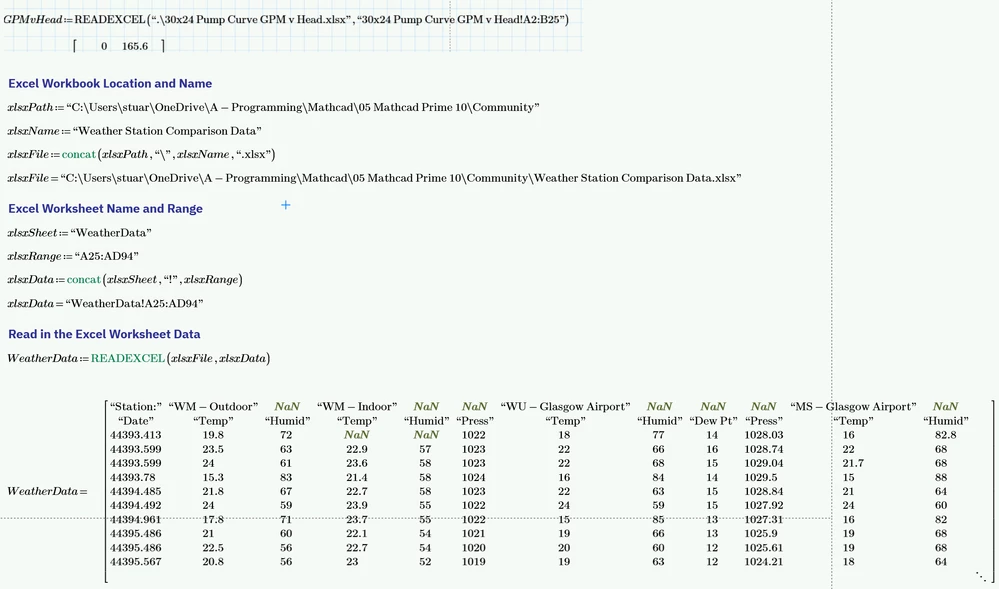
Have you tried defining each element of the workbook name and worksheet name as string variables and using concat to build the longer, complete terms?  


For example:


2024 09 14 A.png


You can break the path, etc names up into as many substrings as is convenient to read in your worksheet.


Stuart

3 replies

23-Emerald V
September 14, 2024

Have you tried defining each element of the workbook name and worksheet name as string variables and using concat to build the longer, complete terms?  


For example:


2024 09 14 A.png


You can break the path, etc names up into as many substrings as is convenient to read in your worksheet.


Stuart

4-Participant
September 24, 2024

Thanks, that worked perfectly.

25-Diamond I
September 15, 2024

The page overhang of your READEXCEL command is not that large.

So you could help yourself either by predefining the path and filename in a variable and use that in the READEXCEL command and/or by choosing a smaller font size for this one command.

23-Emerald V
September 15, 2024

And/or do what I did and use Landscape and Draft modes.


I suppose it's only really a problem if the Mathcad worksheet needs to be printed such that a reader can read the text without a magnifying glass.   <said in my favourite geriatric voice (think Methusalix from Asterix)> "Of course, back in my day, we could print out the right-hand pages.  None of this non-printing Draft mode nonsense, young fella, me lad."

Catalina
Community Moderator
September 19, 2024

Hi @PM_5157504,


I wanted to see if you got the help you needed.


If so, please mark the appropriate reply as the Accepted Solution or please feel free to detail in a reply what has helped you and mark it as the Accepted Solution. It will help other members who may have the same question.
Please note that industry experts also review the replies and may eventually accept one of them as solution on your behalf.


Of course, if you have more to share on your issue, please pursue the conversation.

Thanks,

Catalina | PTC Community Moderator
4-Participant
September 24, 2024

Sorry, I neglected to mark the response as Accepted Solution. My bad.