
1-Visitor
March 30, 2016
Solved

How to change and append matrix items of a globaly defined matrix via program?

  • March 30, 2016
  • 1 reply
  • 3153 views

I want to create a global result table with fixed columns. From anywhere behind the definition of that table I will insert new result lines or modify existing rows. For modification, the first column is a key column, so that the match-Function could give back the row number:
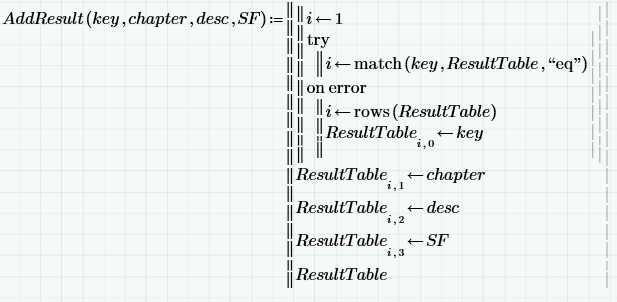
My problem is, that the ResultTable will not be changed. Also not if I write

ResultTable:=AddResult("key123","Cap1","that's a nice result",4.5)

Yes, I know that inside a program the assignments are local. How to make global?

Thank for help!

Best answer by StuartBruff

You have to pass ResultTable as an argument to AdddResult.

Stuart

1 reply

23-Emerald V
March 30, 2016

You have to pass ResultTable as an argument to AdddResult.

Stuart

pklemm-21-VisitorAuthor
1-Visitor
March 30, 2016

Thank you, Stuart

yes that works in that way:

ResultTable:=AddResult(ResultTable,other arguments)

but is there no possibility to change global variables directly?

25-Diamond I
March 30, 2016

> but is there no possibility to change global variables directly?

No. The first time you use ResultTable on the LHS of an assignment in your program you automatically create a local variable with that very name and all subsequent calculations are done using this local variable. So you can't change a worksheet variable from within a program the way you tried to do.

In Mathcad 15 there may be a way of doing it using scripted component - not sure about that and not available in Prime anyway.

R