1-Visitor
May 12, 2020
Solved

How to change fraction on this matrices

  • May 12, 2020
  • 2 replies
  • 2069 views

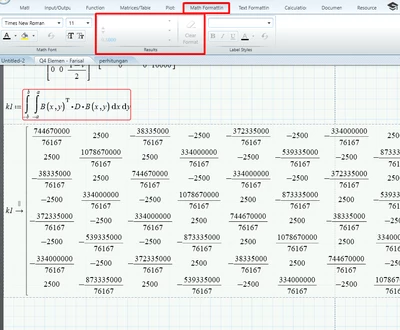
I don't want to display the result as fraction.

I also changed the default to decimal but it doesn't affect.

When i click it there is no result format that could be change.

Someone have idea? (file attached below)

Screenshot_2.png


Best answer by Werner_E

You have to be aware that using the "float" modifier in symbolic evaluations affects not only the display of the result but the precision of the whole calculation. Therefore "float" should be used with great care (or better omitted).
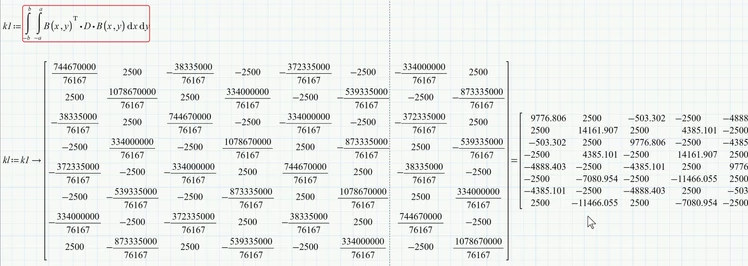
As Luc already wrote you can follow the symbolic evaluation by a numeric one to get float results. To be able to use those results for further calculations you have to redefine kl as shown in the picture below:
Werner_E_0-1589352516753.png

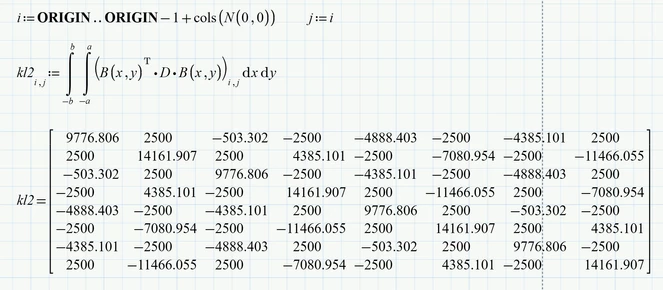
I would do the calculation without any use of the symbolic engine. Simply define two ranges from 0 to 7 and use numeric calculation:
Werner_E_1-1589352609852.png


Prime 6 worksheet attached


2 replies

23-Emerald IV
May 12, 2020

You are using symbolic evaluation (you use an arrow '->') , instead of numeric evaluation (with an equals '='). The numerical formats ONLY apply to numerical evaluation results. You can append an equals to your symbolic result to get numeric floating point results. Or you can evaluate kl numerically right away by typing kl=.


You can also force the symbolic evaluator to produce floating point results by defining at least one of the input values to a floating number. Just add '.0' to the end of one of the integers and see what happens. You will not be immediately happy with the result. The floating point results of the symbolic evaluation can be limited  by using the 'float' keyword, but beware! This actually truncates the result to the numer of decimals chosen.


Success!
Luc

Werner_E25-Diamond IAnswer
25-Diamond I
May 13, 2020

You have to be aware that using the "float" modifier in symbolic evaluations affects not only the display of the result but the precision of the whole calculation. Therefore "float" should be used with great care (or better omitted).
As Luc already wrote you can follow the symbolic evaluation by a numeric one to get float results. To be able to use those results for further calculations you have to redefine kl as shown in the picture below:

Werner_E_0-1589352516753.png

I would do the calculation without any use of the symbolic engine. Simply define two ranges from 0 to 7 and use numeric calculation:

Werner_E_1-1589352609852.png


Prime 6 worksheet attached