
1-Visitor
March 4, 2022
Solved

How to create an automatic repetitive property assigning of a vector for laminate materials

  • March 4, 2022
  • 1 reply
  • 2983 views

Dear PTC community,


Problem description: The following picture shows the input data for my calculation, where I need to enter repetitively the property of each corresponding layer for calculation. Generally, the outer and inner layers are the same material, what repetitively change is the middle layers.
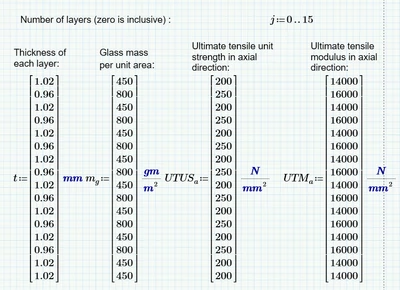
YL_9713387_0-1646389142671.png

Goal: To simplify my input as it is repetitive values.

Is there any way that I can simplify or reduce the amount of input with programming? If so, can anyone give me an idea of how to start, or which function to apply?


Many thanks for your help.


Please find the attached Mathcad Prime 6 file for the above question.
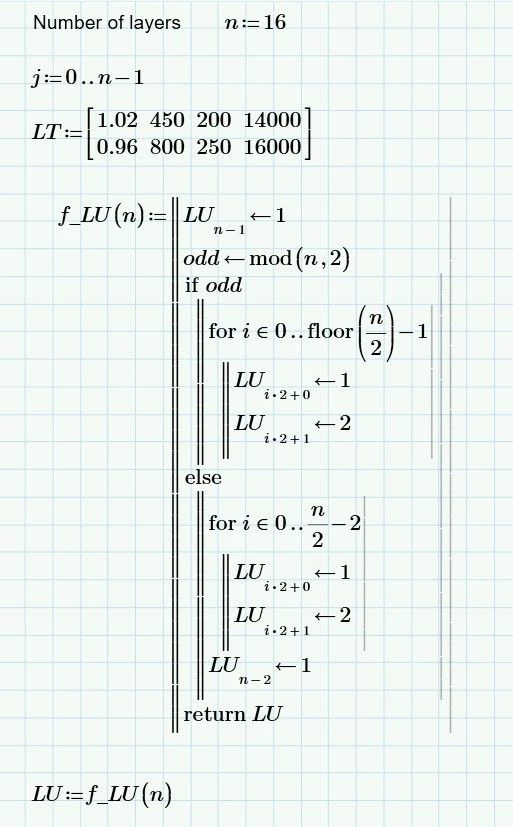
Best answer by terryhendicott

Hi,

Enter the number of layers in the variable "n" at the top of the worksheet.  

This now sets "j"

There is a new function f_LU that creates LU when used in the line LU:=f_LU(n).


Capture.JPG

Cheers

Terry

1 reply

24-Ruby III
March 4, 2022

There is no attachment in your message.

1-Visitor
March 4, 2022

Thanks for informing. Here is the attachment.

21-Topaz II
March 7, 2022

Hi,

First set the Document | Page | Margins to Narrow.
This gives more horizontal space to the calculations.


No need to use programming just use the indexing ability of Prime.


Define a layer type “LT” variable that contains the individual layers used.
Define a layup “LU” variable that contains the layup referencing the types used at each layer.

It is then possible to build the other variables and add units.


I always keep ORIGIN variable at 0 as I am used to programming in C++.

The layup type numbering input is natural and starts at one and adjustment is made for this in the equations.


Capture.JPG

Cheers Terry