19-Tanzanite
August 1, 2023
Solved

How to draw rectangle and triangle from dots?

  • August 1, 2023
  • 3 replies
  • 2134 views

Hello,

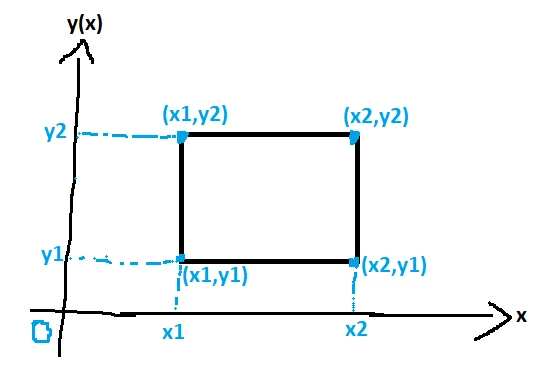
1. Given the below points: (x1,y1), (x1,y2), (x2,y1), (x2,y2), how to make a rectangle in Mathcad Prime based on this points?
Cornel_0-1690892356799.png


2. Given the below points: (x1,y1), (x2,y1), (x3,y2), how to make a triangle in Mathcad Prime based on this points?
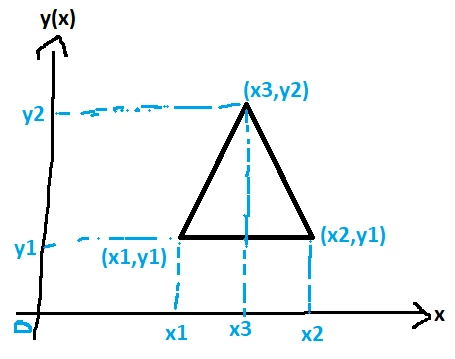

 

Cornel_1-1690892453947.png


Best answer by LucMeekes

You can do both with this simple function:

LucMeekes_0-1690893428181.png

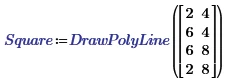
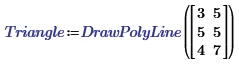
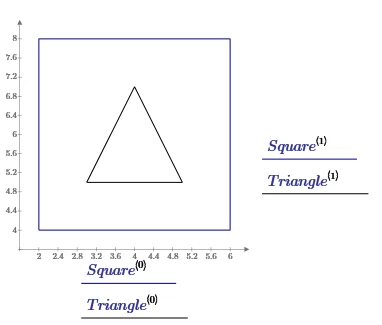
where pl is a nx2 matrix of (x,y) points. Examples:

LucMeekes_1-1690893479123.png

LucMeekes_2-1690893487306.png

LucMeekes_3-1690893515589.png

Success!
Luc

3 replies

LucMeekes23-Emerald IVAnswer
23-Emerald IV
August 1, 2023

You can do both with this simple function:

LucMeekes_0-1690893428181.png

where pl is a nx2 matrix of (x,y) points. Examples:

LucMeekes_1-1690893479123.png

LucMeekes_2-1690893487306.png

LucMeekes_3-1690893515589.png

Success!
Luc

Cornel19-TanzaniteAuthor
19-Tanzanite
August 1, 2023

Is it possible also to put some colour inside the square/rectangle?

Cornel_0-1690895148677.png


23-Emerald IV
August 1, 2023

Sure, refer to the other thread on colour filling.


Success!

Luc

ttokoro
21-Topaz I
21-Topaz I
August 1, 2023

image.pngimage.pngimage.pngimage.pngimage.pngimage.png

t.t.
ttokoro
21-Topaz I
21-Topaz I
August 1, 2023

image.pngimage.png


image.pngimage.png

This is only p1=[3,1],p2=[5,7],p3=[7,1] type.

t.t.
ttokoro
21-Topaz I
21-Topaz I
August 2, 2023

image.pngimage.pngimage.pngimage.png

t.t.