Hi,
Save the relevant values to Excel
Prime cannot export "ranges" to Excel you will get an error
Excel knows nothing about units so exporting units to Excel will get an error.
Error one is an easy fix. Use an undocumented trick. If you inline equals after creating a range Prime will turn it into a vector.
For instance in the enclosed screenshot rangeM1 is changed to a column vector
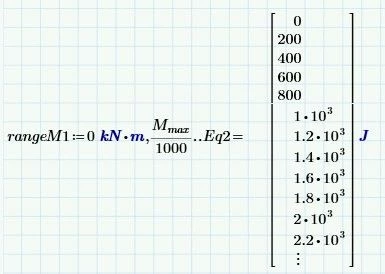
In the WRITEEXCEL statement simply divide by the units to get values without units exported to excel

The above writes into file a.xlsx the now column vector "rangeM1" into sheet 1 column B starting at row 1
You simply need to do this for all the ranges in your sheet saving them to a different column in Excel
Cheers
Terry

