
1-Visitor
Solved

How to export to excel file x-y point of a function?

Hi,

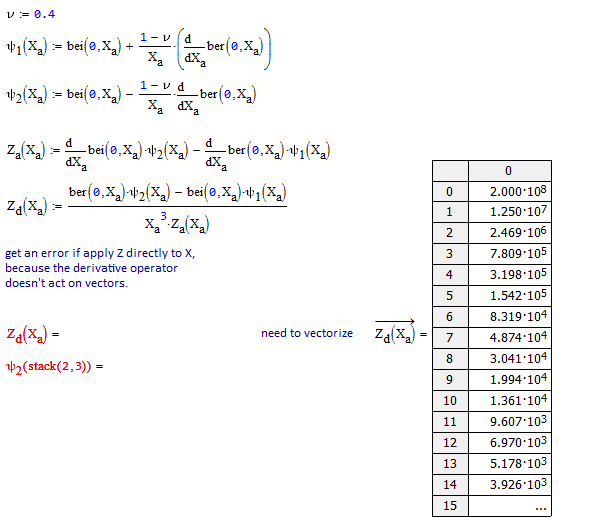
I would like to export to an excel file the coordinate point Xa-Zd. Zd is function of Xa as you can see in attached. I need 1199 values of Zd in excel.

23-Emerald V

Forgot to add .. you'll need to vectorize your function, because the derivative operator only acts on scalars (and it's always safer to do so as there might be other unintended vector operations that occur, such as dot product rather than element-by-element multiplication).
Stuart

5 replies

23-Emerald V

stefano guercilena wrote:

Hi,

I would like to export to an excel file the coordinate point Xa-Zd. Zd is function of Xa as you can see in attached. I need 1199 values of Zd in excel.

There is (I believe, because I don't have Prime on my current PC) a function WRITEEXCEL (or similar) that should do the job.  I think there is also an Excel data output block.  Look up Excel in Prime help.

Here's an example from an earlier Community question:

WriteXL_test.png

Stuart

Translate
1-Visitor

Hi Stuart and thank you for your answer,

I already tried, the problem is that Zd(Xa) isn't a vector/array/matrix but an evaluation of a function!!  I think it's not possible in mathcad

Translate
23-Emerald V

stefano guercilena wrote:

Hi Stuart and thank you for your answer,

I already tried, the problem is that Zd(Xa) isn't a vector/array/matrix but an evaluation of a function!!  I think it's not possible in mathcad

Ah! The real problem is that X.a is a range variable, and WRITEEXCEL expects the data to be a matrix.   There are a couple of ways round this:

I usually use the vec(z) approach and the vec function is a permanent item in my Normal Template ... I think it works in Prime..

Stuart

Translate